
Direct messages on Lewdden give you a 1:1 chat with a creator. You can text them, attach media (when they allow it), unlock paid messages they send you, send tips, and pick up live broadcasts they push to their fans. This guide covers everything from the fan side: where your messages live, how to start a chat, what free vs paid means in a thread, how to unlock a paid message and what happens to it afterwards, what broadcasts look like, and how live chats during a stream differ from regular DMs.
For the creator side of the same system, see Sending paid messages.
1. Where your messages live
Your inbox is at /my-account/chat/ — reach it from the top-right account menu, or directly via the URL. Every direct chat you have with a creator is listed in the rail on the left, sorted by most recent activity, with the open thread on the right.
Threads are 1:1 with a single creator. There’s no group chat — if you DM two creators, you get two separate threads.
A second related page lives at /my-account/purchased-messages/. That’s where you can re-open the images, videos, and audio you’ve already unlocked from any creator without scrolling back through the original threads — useful if you’ve unlocked a lot over time and want them in one place.
2. Starting a chat with a creator
Three common entry points:
- From the creator’s storefront. Open
/store/<creator>/and click the Message creator button near the top of the page. The button opens a thread (existing or new) with that creator and takes you straight to it. - From an order page. If you’ve bought a clip, subscription, or VOD from a creator, the order page (
/my-account/orders/) and the order-thank-you page after checkout both have a Message creator button alongside the order details. - By replying to an inbound message. If a creator messages you first, the thread shows up in your inbox automatically — open it and use the compose box at the bottom to reply.
Brand-new threads inherit the creator’s default chat rules. What that means in practice is the next section.
3. What free vs paid looks like in your thread
Each creator decides what fans can do for free in a brand-new chat with them and what costs money. You don’t have to memorise their rules — the chat itself tells you, in a banner under the thread header. The exact wording depends on which mode the creator picked:
- All free — no banner; you just type and send. The creator allows free text and may also allow free image / voice / video replies.
- Per-text charge — banner reads: “Free text is off here. Text replies cost €X each in this chat and your wallet gets charged when you hit send.” Each text you send debits your wallet by the amount shown.
- Paid text + some free media — banner reads: “Free here: Image, Voice. Text replies cost €X each in this chat.” Lists which media types are free and tells you the per-text price for sending a written reply.
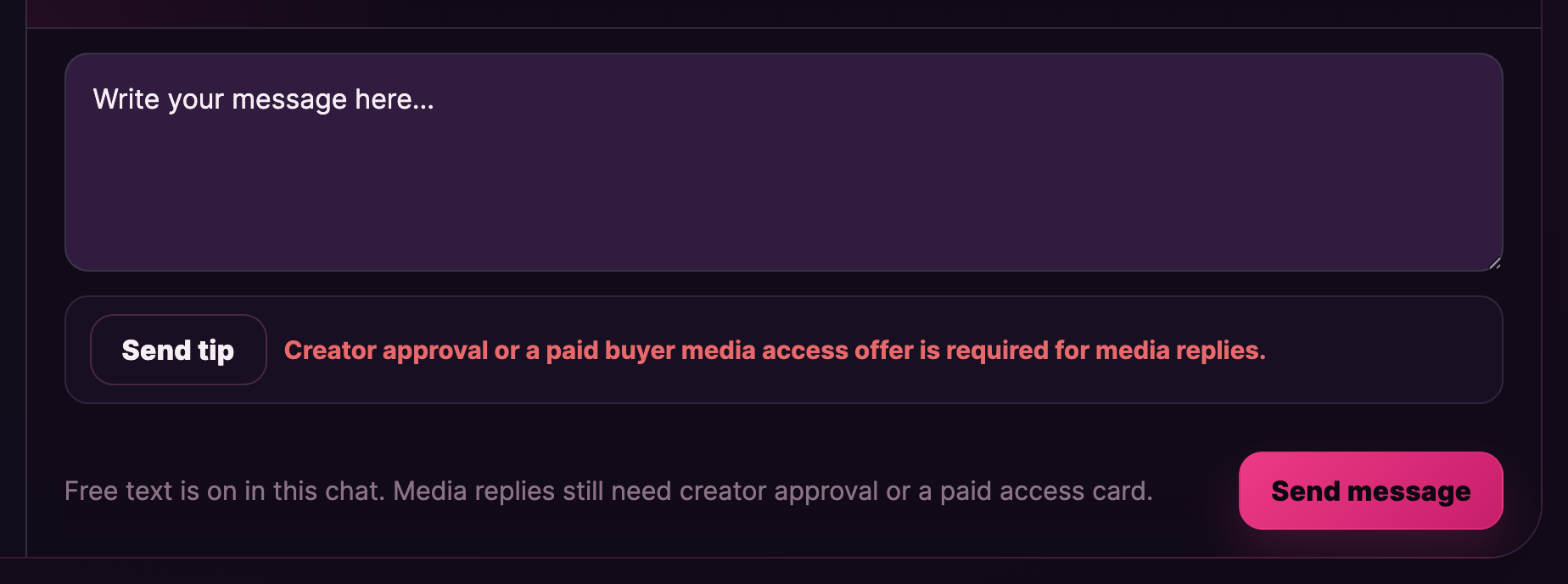
- Free text + media gated — banner reads: “Free text is on in this chat. Media replies still need creator approval or a paid access card.” Text is free; attachments need a separate unlock (see §4).
- Everything off — banner reads: “Free text is not available in this chat right now.” The compose box is greyed out. The creator has muted new fan replies in this thread; you can still receive PPV messages and broadcasts from them, but you can’t send.
If you have an active subscription with the creator, they may have turned Subscribers can send text for free on — in which case per-text charges don’t apply to you for as long as the subscription is active. Your subscription is a free-text pass, not a free-everything pass — paid (PPV) messages from the creator still cost the unlock price.
4. Replying with media (image, voice note, short video)
Whether you can attach a file in your reply depends on the creator’s chat rules:
- Free media types are listed in the banner — if it says “Free here: Image, Voice”, you can attach images and voice / audio files for free without unlocking anything.
- Locked media types — the attach button shows a tooltip pointing to the creator’s paid media access offer (if they’ve published one). Pay the offer once and the listed types unlock for the rest of the conversation.
- Voice notes — attach only. Fans can only attach an audio file from their device. There’s no record-microphone button on the fan side; that’s creator-only.
A reply is one file at a time. For longer back-and-forth, send several messages in sequence.
The same content rules that apply on the rest of the platform apply in DMs — see Prohibited content for the boundary.
5. Unlocking a paid (PPV) message from a creator
A paid message is the creator-side feature most fans interact with first: a single message that contains an image, short video, or voice note locked behind a one-off price.
What you see
A locked tile in the thread shows the creator’s caption (if any), the unlock price in EUR, and an Unlock button. Until you unlock, the file itself is hidden.
How to unlock
- Make sure your wallet has at least the unlock price. If your balance is low, top up first — see Topping up your wallet.
- Click Unlock on the tile.
- Your wallet is debited by the unlock price. The tile flips open and the file becomes viewable inline.
- A short system line drops into the thread reading “PPV message unlocked.” — a record that the unlock went through.
If your wallet is short, the platform returns an “Insufficient wallet balance.” error and the unlock is cancelled — no charge is taken. Top up and try the Unlock button again.
After you unlock
- The unlock is permanent. Come back to the thread tomorrow, next week, or next year — the tile stays open and the file stays viewable.
- You can re-open the file from /my-account/purchased-messages/. Every PPV you’ve unlocked, across every creator, lives there as well, so you don’t need to scroll the original thread to find it.
- Refunds. PPV unlocks aren’t generally refundable — they’re digital goods, delivered instantly. The exception: if the platform takes the file down for a content-rules violation, your wallet is credited back automatically without you having to ask. If the creator deletes the file themselves, you keep access (the platform retains a copy for unlock-receipts).
Voice notes specifically
Voice notes from a creator behave the same way — locked tile with unlock price, click to unlock, plays inline once paid. The platform handles the recording the creator made; on your side it’s just a play button after unlock.
6. Broadcasts — when one message lands in your thread
Sometimes a creator sends one message that goes out to many fans at once — a broadcast. From your side it shows up inside your existing thread with that creator (no separate channel) and looks like a normal message, except for a small Broadcast pill at the top of the bubble showing the audience the creator chose — typically Followers + previous buyers + subscribers, or scoped to Followers, Previous buyers, or Subscribers only.
A broadcast can be:
- Free text — just an update.
- Free media — an image, short video, or audio file you can view directly.
- A clip card — a card linking to one of the creator’s clips on their storefront. Tapping it opens the clip’s product page.
- PPV — a locked tile with an unlock price. Same unlock flow as §5; each fan unlocks individually.
You can’t opt out of a single broadcast — once it’s in your thread, it’s in your thread. If you don’t want broadcasts from a creator at all, the cleanest move is to unfollow them (if you were getting broadcasts because you follow), let your subscription lapse (if subscriber-only), or stop interacting with the thread (it stays in your inbox but no new broadcasts arrive past the audience cut-off).
7. Tipping a creator inside a chat
Every chat has a Send tip button in the compose box. Tipping is on by default — you don’t need any special permission from the creator. The flow is wallet-driven: you click Send tip, type an amount, confirm, and your wallet is debited. The creator sees the tip drop in the thread alongside their messages.
Chat tips are separate from livestream tips — tipping a creator from your DM thread doesn’t add to any active stream’s tip goal. For the livestream-side tipping flow (with tip menus and goals), see Watching a live stream.
8. Live PMs — the chat that opens during a stream
When a creator goes live and you’re in their public room, a live private message thread can open automatically between the two of you, separate from any regular DM you may already have. It’s a temporary channel for show-time chat that doesn’t tangle with the main thread.
Once the stream ends, the live PM thread becomes read-only. You’ll see a small notice on it reading “This live PM is now read-only.” You can still scroll back through the messages, but you can’t send new ones. Either side can re-open a regular DM from the creator’s storefront if you want to keep talking — it’ll be a fresh thread in your /my-account/chat/ inbox under the same creator.
Live PMs are also where exclusive private (cam2cam) and standard private show chat lives during the show. See Watching a live stream — private shows for the show side; the chat behaviour described here applies the same way.
9. Custom video orders — different from PPV
If you want a creator to make something specifically for you — your scenario, your name mentioned, a particular outfit — that’s a custom video order, not a PPV. Custom orders have their own request form, an explicit deadline, and a payment-on-delivery flow rather than pay-on-unlock. The full custom-order walkthrough has its own help page (coming soon); for now, look for a Order Custom button on the creator’s storefront if they accept them.
PPV is the right tool when the creator has already produced something and you want to unlock it. Custom orders are the right tool when you want something made-to-order.
10. When something’s wrong — contact support
For DM-related issues, open a ticket at Contact support. The right category depends on what’s going wrong:
- Unlock charged but file won’t show / appears blank — category Streaming playback. Include the thread URL and the time of the unlock.
- You think a creator broke the rules in DMs — category Abuse. Send the thread URL and a short description; do not screenshot prohibited content into the ticket — the team will retrieve what’s needed from their side.
- Wallet was debited but the unlock didn’t go through — category Wallet & payments. Include your order number from
/my-account/orders/if there is one, or the time of the click. - General DM behaviour question — category Account & login. Useful when you’re not sure why a chat is set up the way it is.
See Contacting support for what to include in each category.
Common questions
Q: A creator I subscribed to is asking me to pay per text. I thought the subscription covered DMs.
Subscriber free-text is a creator option, not a default. If they’ve turned it on, the per-text charge banner won’t appear in your thread for as long as the subscription is active. If they haven’t, per-text still applies. Check the banner under the thread header — if it says “Free text is off here. Text replies cost €X each in this chat…”, the creator hasn’t turned the subscriber waiver on for this thread. You can ask them to, but they may decline.
Q: How long are unlocked PPV messages kept on my account?
Indefinitely. Once unlocked, the file stays in your thread (and in /my-account/purchased-messages/) for as long as the platform retains it. The only routes to losing access are: a content-rules takedown of the file (in which case your wallet is automatically credited back), or you closing your fan account.
Q: Can I send a creator a voice note from my phone?
Only by attaching an existing audio file from your phone’s storage — there’s no record-microphone button on the fan side. Most phones have a Voice Memos / Recorder app that produces M4A or MP3 files you can then attach. Whether you can attach voice notes at all depends on the creator’s chat rules — see §4.
Q: Will the creator know I read their message?
Read receipts aren’t shown in the chat header. Once you open a thread, the message is marked read on the platform’s side, and the creator’s inbox stops bolding the thread — that’s the indirect signal. There’s no read-time stamp.
Q: Can I delete a message I sent by accident?
You can delete the message from your own view (long-press the message bubble for the option). The creator’s copy of the message stays unless they also delete it from their side. For something more serious — wrong file attached, sensitive content sent in error — open a support ticket and the team can wipe the message from both sides.
Q: I top-up’d to unlock a PPV but the unlock still didn’t go through.
Wait a few seconds — the wallet credit may not yet have settled. If the unlock still fails, refresh the page and try again. If your wallet shows the topped-up amount but the unlock still says “Insufficient wallet balance,” open a support ticket (category Wallet & payments) with the thread URL and the unlock price.
Q: A creator messaged me first and I don’t want to chat with them. Can I make them stop?
The most effective move is to stop replying — most creators triage their inbox by who’s responding and quietly de-prioritise threads that go silent. If a creator is messaging in a way that breaks platform rules (harassment, spam, content-rules violations), report the thread under Reporting a creator or content — the team can take action and, where appropriate, prevent the creator from messaging you again.
Q: I bought a paid message and want a refund — I changed my mind.
PPV unlocks aren’t refundable for change-of-mind. The exception is content-rules takedowns, which trigger an automatic refund — you don’t have to ask. If you think the file you got materially didn’t match what the creator’s caption promised, that’s a content issue, not a billing one — open a support ticket (category Account & login) with the thread URL and the team will look into the listing.
Q: Can a creator see my email address from a DM?
No. The creator only sees your username (the one on your fan profile) and any avatar / display name you’ve set. Your email and any other account data aren’t shared with creators through the messaging system.
Q: My DM with a creator is gone — was it deleted?
First check the inbox filter at the top of /my-account/chat/ — if you’ve filtered to “Unread only” and the thread is fully read, it’s hidden from view. Reset the filter and the thread should be back. If the thread is genuinely gone, the creator may have closed their store or the moderation team may have actioned the thread for a content-rules issue — open a support ticket if you’re not sure why.
Q: Is the chat tip the same as a livestream tip?
No. Chat tips are sent inside a DM thread and don’t count toward any active stream’s tip goal. Livestream tips happen during a stream from inside the live room (where there’s a tip menu and a goal bar) and do contribute to the goal. Both come from your wallet; both are fully delivered to the creator (less platform commission, which is the same for both).
Need more help?
- Sending paid messages — the creator-side view of the same system
- Topping up your wallet
- Watching a live stream
- Reporting a creator or content
- Contacting support







