
If your wallet balance changed and you don’t remember spending or topping up, this guide explains what may have happened. The most common reason is a refund or a manual adjustment made by the Lewdden team. Every change is recorded on your wallet history with the reason.
This article is the companion to How the wallet works (which walks the page top to bottom).
1. Where to look first
Sign in and open My account → Wallet. Scroll past the balance card and the top-up form. At the bottom you will find Your wallet history.
Every credit (money in) and debit (money out) is on that list, newest first, with the date, what it was for, and the amount.
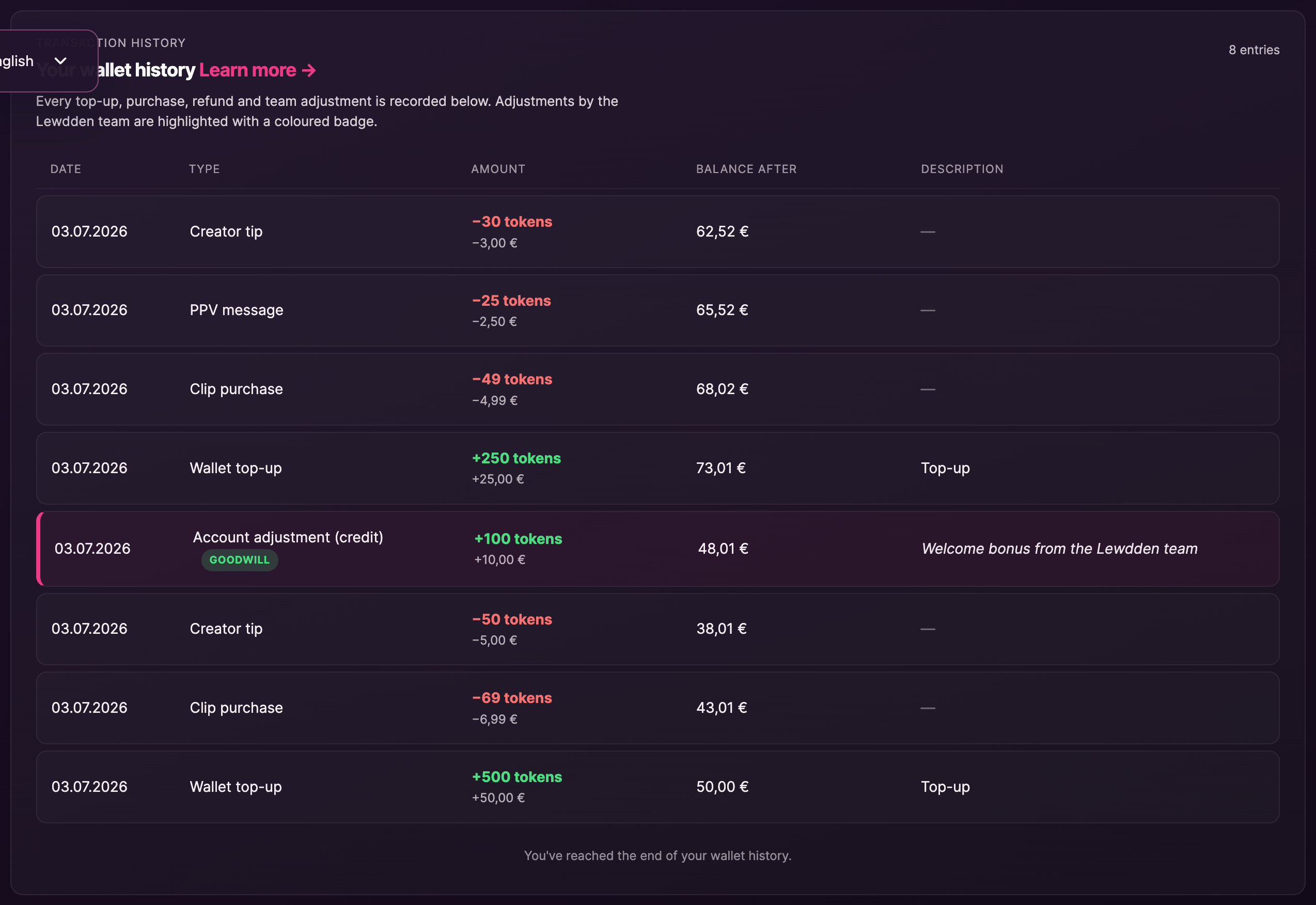
2. The five things that can change a balance
| What changed it | How it looks in your history |
|---|---|
| You topped up | Type: Wallet top-up. The description links to the order receipt. Green amount with a + sign. |
| You bought or unlocked something | Type: Clip purchase, Live message unlock, Creator tip, etc. Red amount with a − sign. |
| An unlock was refunded automatically | Type: Refund. Some live message unlocks come with a 5-minute grace window — if the creator doesn’t respond in time, the tokens come back on their own. |
| The Lewdden team credited you | Type: Account adjustment (credit), highlighted with a teal accent and a coloured badge (Refund, Goodwill, Correction…). The description is the reason the team wrote when applying the adjustment. |
| The Lewdden team debited you | Type: Account adjustment (debit), same highlighted treatment. Rare — usually this only happens to reverse an earlier credit that turned out to be a mistake, or to settle a chargeback. |
3. What the badge categories mean
Adjustment rows always carry a small coloured badge that tells you the reason category at a glance.
- Refund — money is coming back to your wallet because something didn’t deliver as expected (a creator was offline, content was removed, a charge went through twice).
- Goodwill — a credit applied as a courtesy. You don’t owe anything in return.
- Correction — a balance fix because an earlier credit or debit was wrong. The description will say what was being corrected.
- Chargeback — a payment you made was reversed at the card or bank level. Your wallet is debited to reflect the funds going back to the card.
- Dispute — a dispute case was opened and is being resolved. The description will explain which side the resolution went.
- Adjustment — anything that doesn’t fit the categories above. The description should still explain what it’s for.
4. When you’ll see the change
Wallet adjustments take effect as soon as the team applies them. The row appears in your wallet history right away, and the balance card at the top of the page updates the next time you load the page (or click Refresh balance).
You will not get an email or in-app notification when an adjustment is applied. We surface every change in the history list so you can review at your own pace.
5. If the reason doesn’t make sense
The description on every adjustment row is written by the team member who applied it. If you read it and it still isn’t clear what changed, or you think the adjustment was applied in error, reach out to support and quote the date and amount from the row.
- Customer support: lewdden.com/contact
- Include in your message: the date and time of the adjustment, the amount, and what the description said.
The team has access to the full internal note (which can be longer and more technical than what is shown to you) and can explain the context in detail.
6. Frequently asked questions
Will my balance ever change without me seeing a row in the history?
No. Every change is recorded. If you ever see a different balance with no matching row, that is a bug and we want to hear about it.
Can I undo an adjustment?
Adjustments are applied by the team and can only be reversed by the team. If you think one was applied in error, contact support and we’ll look at it.
Does an admin adjustment affect my tokens or my EUR balance?
Both, because they are the same balance. 1 token = €0.10. Your wallet history shows both formats so you can quickly see the impact in whichever unit you prefer.
Why is there a category but no description?
The team is required to write a user-facing reason for every adjustment. If a row shows only the category, that is a bug — please flag it to support and include the row date.
Last updated: 2026-05-12.







