
Liked a post enough to send a few tokens? Every public-feed post and every subscriber-only post you’ve unlocked has a tip button under it. Tipping takes two clicks: open the picker, pick or type an amount, send. This guide covers the math, where to find the button, what happens when your wallet is short, and what fans see after a tip lands.
1. Where the tip button is
The tip button sits under every feed post — both on the post card as you scroll the feed and on the full-post page when you open one. It’s right next to the like and comment buttons. Click it to open the tip picker.
- On the feed itself (e.g. /my-feed/ or a creator’s profile feed): each post card has its own tip button. The total tokens fans have already tipped on that post shows next to the icon.
- On the full-post page (when you click into a single post): the same tip button is in the row of post actions, alongside like, comment, and report.
If you’re not signed in, the tip button bounces you to sign-in first — only signed-in fans can tip.
2. How to send a tip
Two clicks plus a number:
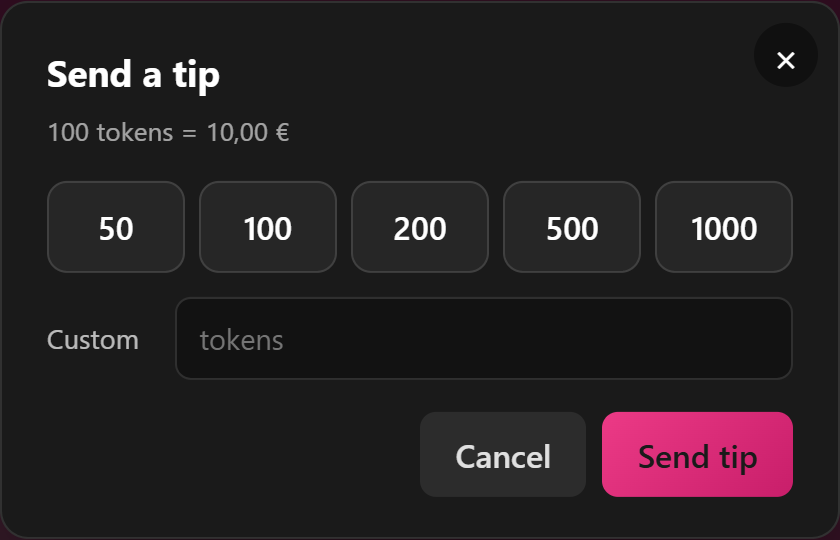
- Click the tip button. A small window opens titled “Send a tip”.
- Pick or type an amount. Five preset buttons let you tap a tier — 50, 100, 200, 500, or 1000 tokens. Or use the Custom field below the presets to type any whole number from 1 token upwards.
- Click “Send tip”. The button changes to “Processing…” while it goes through. On success, the window closes and a small toast says “Thanks for the tip!”. The post’s tip total ticks up in place — no page reload.
If you change your mind before sending, click Cancel, the close button (×), or click outside the window. Nothing leaves your wallet until you actually press Send tip.
3. How much a tip actually costs
Tips are charged in tokens, debited straight from your wallet. The conversion is fixed: 100 tokens = 10,00 €. So 1 token = €0.10.
- 50 tokens = €5.00
- 100 tokens = €10.00
- 200 tokens = €20.00
- 500 tokens = €50.00
- 1,000 tokens = €100.00
The picker shows the conversion in small text under the title (“100 tokens = 10,00 €”) so you don’t have to do mental math.
Minimum tip: 1 token (€0.10). Anything less is rejected with the message “Tip amount must be at least 1 token.”
Maximum tip: there’s no hard cap — you can tip whatever’s in your wallet. If you try to send more tokens than you have, you’ll get the top-up flow described in §4 instead.
4. What happens if your wallet is short
If you try to send more tokens than your wallet covers, the tip window doesn’t fail — it switches to a top-up window automatically. The top-up window shows the amount you were trying to tip and walks you through adding funds. Once the top-up clears, the tip you were trying to send goes through using the freshly added balance.
If for some reason the top-up window doesn’t appear, you’ll see an error in the tip window with a “Top up wallet” link instead. That link opens /my-account/wallet/ in a new tab, where you can add funds and then come back and resend.
For step-by-step on how the wallet top-up flow itself works, see Topping up your wallet.
5. What’s visible after you tip
Tips on feed posts are public-by-default. After your tip lands:
- The post’s tip total ticks up. The number next to the tip icon on the post card shows the running total of tokens fans have tipped on that post. It’s visible to everyone who can see the post — including the creator, other fans, and anonymous viewers (for public posts).
- Your display name shows up in the tipper list on the post’s engagement panel — same as if you’d liked or commented on it. There’s no anonymous tip option right now; if your display name showing matters, set it the way you want it on your account page before tipping.
- Your wallet balance updates in place on /my-account/wallet/, with a line entry showing the debit and the post you tipped.
- The creator gets a notification (if they have tip notifications turned on). Many creators acknowledge tippers in the comments — you might get a thank-you reply, especially for larger tips.
6. What you can and can’t tip on
You can tip:
- Any public feed post you can see — your subscriptions feed, the creator’s profile, your followed feed.
- Subscriber-only posts you’ve unlocked (because you’re subscribed).
- Subscriber-only posts you haven’t unlocked — yes, even locked posts. Tipping a locked post is a way to show appreciation for the post existing without committing to a subscription. The tip doesn’t unlock the post, though — see §7.
You can’t tip:
- Your own posts. If you’re signed in as a creator and you click your own tip button, it’s blocked: “You cannot tip your own post.”
- While signed out. Anonymous viewers see a guest version of the button that bounces to sign-in. Sign in, then tip.
- Posts that have been deleted. If a creator deletes a post, the tip button goes with it. If you happen to send a tip in the few seconds between the delete and the page refresh, the system catches it and refunds your wallet automatically — the creator gets nothing on a deleted post.
7. Tips don’t unlock anything
This is the most common mix-up worth calling out: a tip is not a paywall bypass. Tipping a subscriber-only post you haven’t unlocked doesn’t unlock it. Tipping a clip doesn’t buy the clip. Tipping during a livestream doesn’t extend a private show.
If you want to unlock a subscriber-only post, you need to subscribe to the creator. If you want to keep a clip, buy it from the storefront. If you want a private livestream, follow the live-stream paid-show flow. Tips sit alongside those — they’re a separate, voluntary thank-you.
That said, creators see who tips and how much. Many take note. Some will pin a thank-you in the post comments; some respond more warmly to messages from fans who tip; some will create the kind of content their tippers signal they like. None of that is a guaranteed reward — tips are still a thank-you, not a transaction — but it’s a real second-order effect.
8. Are tips refundable?
Tips are final from your side: no, you can’t request a refund on a tip you sent. The token amount leaves your wallet the moment the tip processes; it goes into the creator’s earnings pipeline the same day. There’s no cooling-off window.
The two cases where the system does refund automatically:
- The post was deleted between you opening the picker and the tip processing. The tip cancels and your wallet is refunded automatically.
- Something fails on our end after the debit (rare). The system reverses the debit with a reversal entry — you’ll see the original debit and a matching reversal in your wallet history. You don’t need to ask support; reconciliation is automatic.
If you sent a tip you regret because you typed the wrong amount, your only option is to ask the creator directly. Some creators will return tokens via a free-message refund; many won’t. Tipping is voluntary and the platform treats it as final.
9. FAQ
Q: Why is there no anonymous tip option?
There just isn’t one right now. Every tip carries the tipper’s display name through to the creator and into the public engagement panel. If a fully anonymous version of tipping ever ships, it’ll be announced. For now, tipping is a public act.
Q: I tipped 100 tokens — when does the creator see it?
Within seconds. The creator’s earnings page shows the tip with the post it was tipped on the moment the debit clears your wallet. If they have push or email notifications on for tips, they’ll get pinged about it.
Q: Can I tip a fixed EUR amount instead of tokens?
No — the picker is in tokens. You pick a token amount; the equivalent in EUR is shown in the small text under the title (“100 tokens = 10,00 €”). If you want to send €5, that’s 50 tokens; €10 is 100 tokens; €25 is 250 tokens.
Q: I sent a tip but the total didn’t update on the post. What now?
Refresh the page first — most “didn’t update” reports are caching. If the post is still showing the old number after a refresh, check /my-account/wallet/ to see whether the debit actually landed. If your wallet was charged but the post total is wrong, open a ticket from Contacting support under Wallet with the post URL and the time you tipped. We can trace the entry.
Q: Can the creator block me from tipping them?
If a creator has blocked you sitewide, you won’t see their posts in the first place — so there’s nothing to tip. There isn’t a separate “tip-only” block.
Q: Does tipping count toward the creator’s subscriber tier or any unlock?
No. Tips are a thank-you channel, not a tier counter. The 200 tokens you tipped this month don’t move you toward a subscription discount or a “top tipper” perk on the platform side. (Some creators do their own informal “top tipper of the month” shoutouts — that’s between you and them.)
Q: Can I see a history of tips I’ve sent?
Yes — your wallet history at /my-account/wallet/ shows every debit, including each feed-post tip with the post it was sent on. There isn’t a separate “tips I’ve sent” page; the wallet history is the one source.
Q: I tipped on a livestream, not a feed post — is the math the same?
The conversion is the same: 100 tokens = 10,00 €. The live-stream tipping flow is its own thing, with creator-set tip menus and optional Lovense triggers — see Setting up your tip menu on the creator side, or watch a live stream to see the difference.
Need more help
If a tip didn’t process, your wallet looks wrong, or the picker won’t open, open a ticket from Contacting support under Wallet. Include the post URL, the amount you tried to send, and the rough time. We can trace the wallet entry and reconcile.







