
Video guide
Prefer to watch? This video walks through enabling your subscription — price, longer plans, which clips are included, and saving.
A subscription on Lewdden is a recurring monthly fee a fan pays to unlock your subscriber-only content for as long as the subscription stays active. This guide walks you through enabling subscriptions on your store, picking your monthly price, optionally offering longer-period plans (3/6/12 months), choosing which clips are included in the bundle, and the optional “free text in messaging” toggle. Setup takes about ten minutes once you’ve decided what to charge.
For the customer-side view of what subscribers see when they hit your storefront, read Subscribing to a creator. Your subscription settings live at /store-manager/creator-subscriptions/.
1. What subscribers unlock when you turn this on
When you enable subscriptions, fans who subscribe get:
- Full free streaming access to the clips you include in the bundle (see §4 — you choose all clips or a curated list).
- Subscriber-only feed posts. Posts you mark as subscriber-only show up in their feed; non-subscribers see a locked teaser with a “Subscribe to unlock” button.
- The “Subscribed” tab in their library — a dedicated section that lists the creators they currently subscribe to.
- Optionally, discounted prices on every other clip in your store — clips that aren’t in the inclusion bundle. You set a global percentage or pin per-clip subscriber prices on the same settings page; see Clip discounts for subscribers.
- Optionally, free text messaging with you, if you turn on the “Subscribers get free text in messaging” toggle (see §5).
What subscribers do NOT automatically get: free livestream access, free ticketed shows, free 1:1 private shows, free physical merchandise, free custom orders, or free tips. Those are separate purchases. Subscriptions are the recurring access tier; everything else is one-off pricing.
2. Enabling subscriptions and setting your monthly price
- Open Store Manager → Creator Subscriptions.
- Toggle Enable subscriptions at the top of the page.
- Set your Monthly price (1 month plan) in EUR. This is the recurring fee a fan pays every 30 days while the subscription stays active.
- Click Save at the bottom of the page. Your subscription is live; the Subscribe button appears on your storefront within a minute.
The 1-month plan is mandatory — the platform always offers it whenever subscriptions are enabled, because that’s the floor most fans subscribe at. You can’t disable the 1-month plan independently; if you don’t want to offer subscriptions at all, toggle the master Enable switch off.
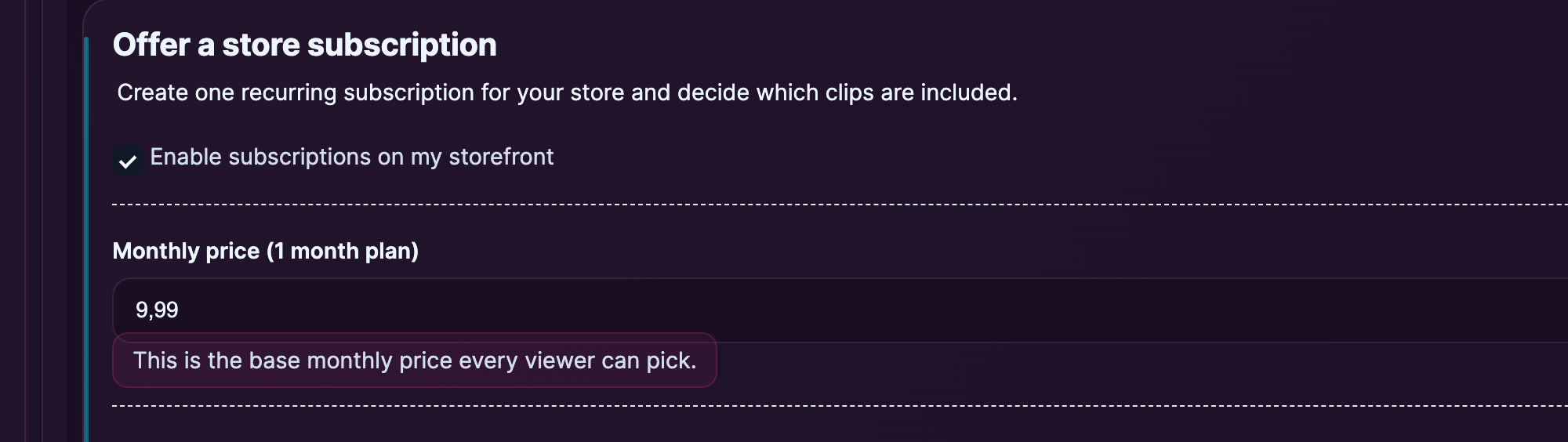
Picking a price:
- A common starting range is €7.99–€19.99 per month, depending on niche and what you bundle in.
- The platform doesn’t enforce a minimum or maximum on the subscription price (the form accepts any positive value), but very low prices (€1–€3) tend to attract bargain-hunters who churn fast and very high prices (€50+) need a strong unique-content story to convert.
- You can change the price after the fact — existing subscribers stay at the price they signed up at until they cancel and resubscribe. New subscribers pay the new price from the moment you save.
3. Multi-period plans — 3, 6, and 12 months
Beyond the 1-month plan, you can opt in to offer longer-period plans. Subscribers pay the full period upfront and the subscription auto-renews at that period’s length.
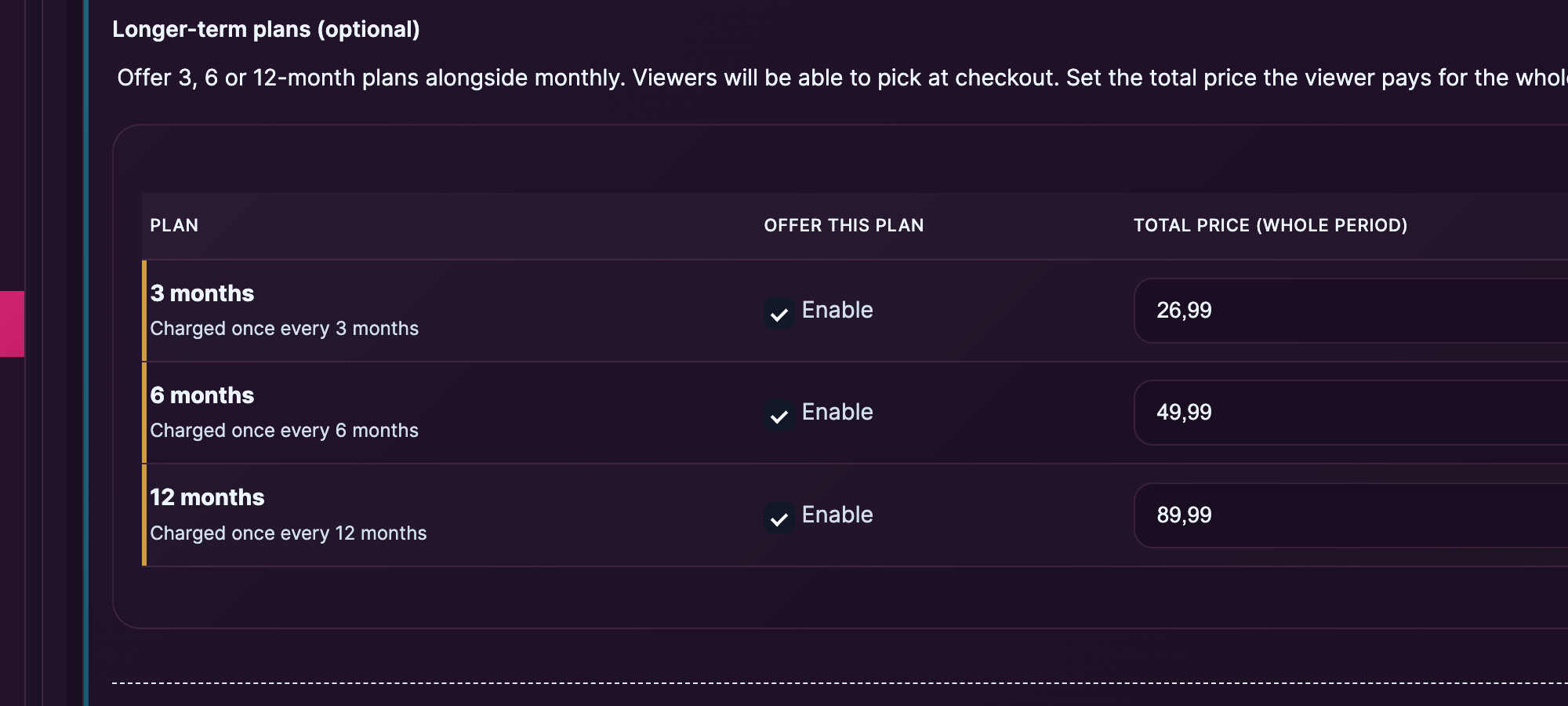
The plan table on the settings page lists the optional periods:
- 3 months — quarterly billing.
- 6 months — semi-annual billing.
- 12 months — annual billing.
For each plan you want to offer, toggle Enable and set a Total price (whole period). The price is the total for that period, not a per-month equivalent — so a 3-month plan at €19.99 is €19.99 charged once, then again 3 months later, not €19.99 × 3.
Standard practice is to offer a discount for longer-period plans:
- 1 month at €9.99
- 3 months at €24.99 (~€8.33/month — saves €5)
- 6 months at €44.99 (~€7.50/month — saves €15)
- 12 months at €79.99 (~€6.67/month — saves €40)
The discount makes the longer plan worth committing to and reduces churn — a fan on a 12-month plan stays subscribed all year. The exact discount level is yours to set; the numbers above are illustrative, not enforced.
On the customer side: when a fan clicks Subscribe on your storefront, they see a plan picker with whichever plans you’ve enabled. They pick one, complete checkout, and the subscription starts immediately. See Subscribing to a creator for the customer-side walkthrough.
4. Choosing which clips are included in the bundle
Subscribers get free streaming access to clips you mark as included. The setting is one of two modes:
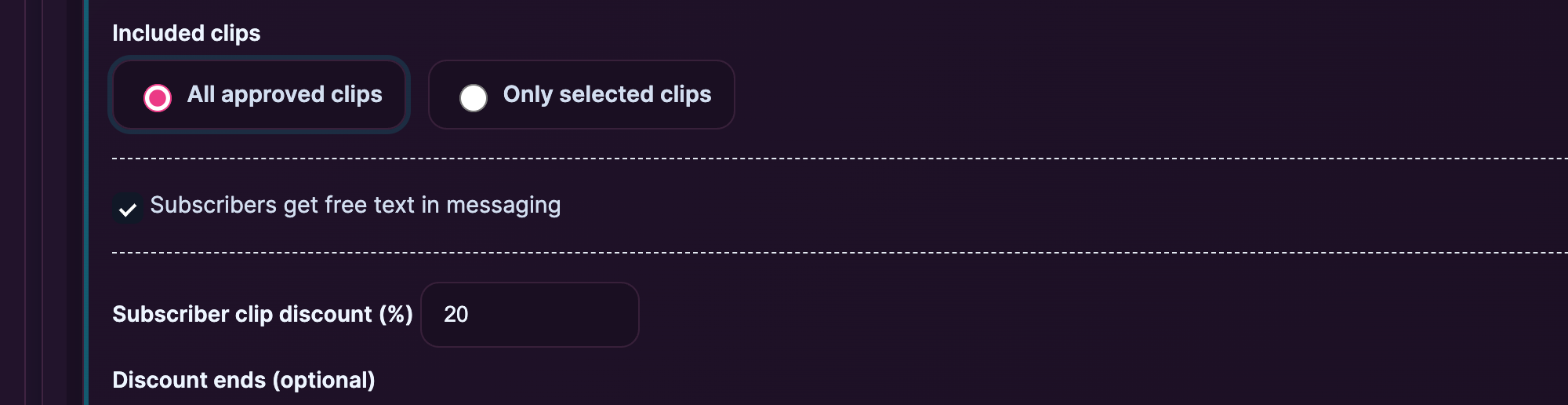
- All approved clips. Every clip on your store is automatically included — past clips, current clips, and any future clips you upload. This is the default and the simplest to manage. Recommended for most creators.
- Only selected clips. You curate a list. Only the clips you explicitly mark are free for subscribers; every other clip stays at its regular (or sale) price even for subscribers. Useful if you want to keep premium tiers, custom-order recordings, or specific high-value clips outside the subscription bundle.
To switch to selected mode:
- Click the Only selected clips radio.
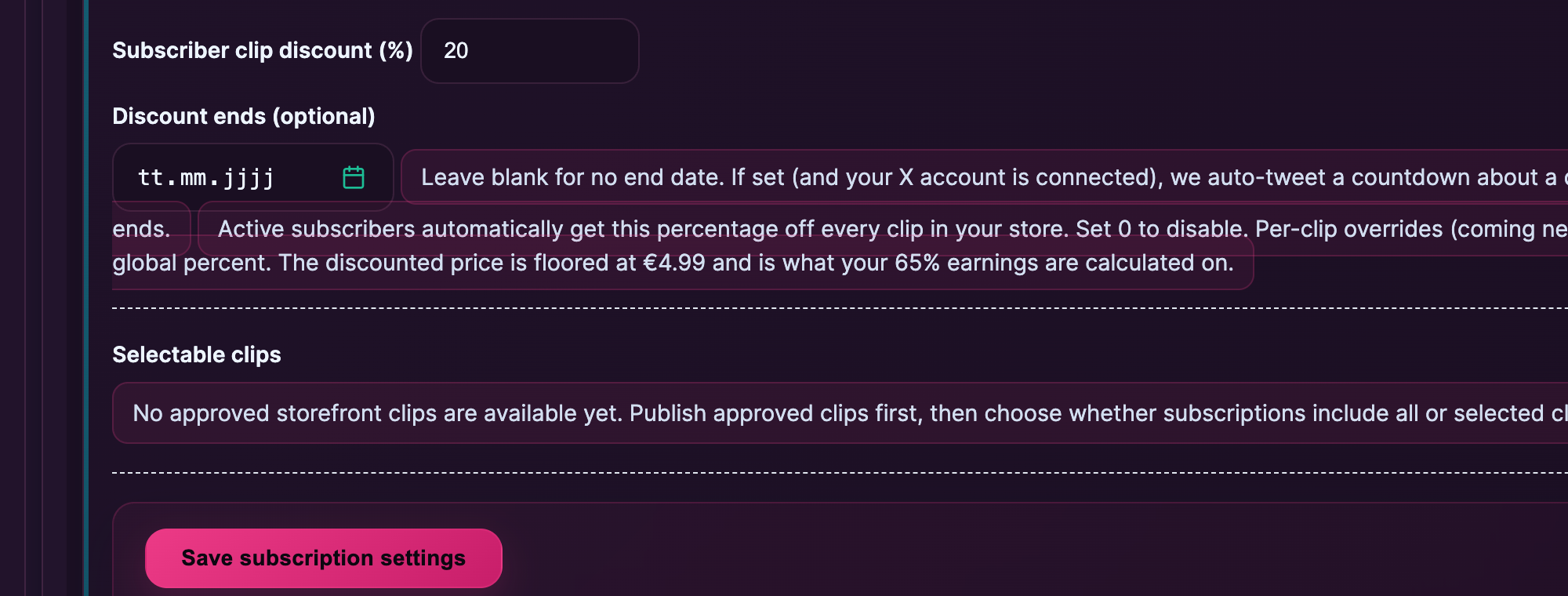
- The “Selectable clips” list appears below — every approved clip on your storefront, with a checkbox.
- Tick the clips you want included.
- Click Save.
A subscriber’s storefront view shows an “Included in subscription” badge on each included clip, so they can see at a glance which ones come with their subscription. Non-subscribers see the same badge as a “what you’d unlock” preview.
Switching modes later is fine — flip from All to Selected (or vice versa) and save. Existing subscribers immediately see the new bundle. There’s no migration step or grandfathering: if a clip was included yesterday and isn’t today, it goes back to its regular price for everyone. Be deliberate about this — pulling a clip out of the subscription bundle on a creator with active subscribers can feel like a takeback.
Beyond the inclusion bundle, you can also discount the price of clips that aren’t in it — set a global percentage or pin per-clip subscriber prices on the same settings page. See Clip discounts for subscribers for the full setup walkthrough; Pricing your clips §5 covers how subscriber pricing stacks with sale prices and the €4.99 floor.
5. The “Subscribers get free text in messaging” toggle
A separate toggle on the subscription settings page lets you waive paid-text-message charges for active subscribers. When it’s on:
- Subscribers can send and receive plain text messages with you for free, even on a store where text messaging normally has a per-message charge.
- Paid clips, photos, and voice notes attached to messages still cost what you’ve set them at — the toggle only covers plain text.
- Non-subscribers still pay the normal per-message rate (or can’t message you at all, depending on your messaging settings).
Most creators turn this on as part of the subscriber benefit bundle — the marginal cost of plain text is essentially zero, and “I can chat with you any time” is a strong incentive to subscribe and stay subscribed.
If you don’t want subscribers to have direct messaging access, leave this off — your messaging policy stays whatever you’ve configured for general fans.
For the full picture of how messaging pricing works (PPV media, per-text charges, paid-media-access offers), see Sending paid messages.
6. How subscription earnings flow to your payout
When a fan subscribes:
- They pay the period price you set (1-month, 3-month, etc.) in EUR.
- The payment processor takes the gross amount.
- 50 % is recorded to your earnings ledger immediately — same split as on every other transaction surface (clips, tips, custom orders).
- Earnings accumulate through the period. At the end of the period, the platform exports your share to a SEPA payout, which reaches your bank account between the 4th and the 7th of the month (the 7th at the latest).
- Renewals charge the same way — every renewal hit is another transaction, processed at the same 65 / 35 split.
If a subscriber cancels mid-period, no refund is owed (subscriptions are digital and not refundable per platform policy) and no chargeback is initiated; their access continues to the end of the paid period and then locks. See Cancelling a subscription for the customer-side cancellation flow.
For the full payout walkthrough — how often, what hits your IBAN, what happens with refunds and chargebacks — see How creator payouts work.
For day-to-day management of your active subscribers — viewing who’s subscribed, when they joined, exporting the list, and the soft 5,000-subscriber cap — see Managing your subscriber list.
Common questions
Q: Is there a minimum subscription price?
The platform doesn’t enforce a minimum on the form. You can set €1, €5, €9.99 — whatever feels right. In practice, €7.99–€19.99 per month is the typical range; below €5 attracts low-quality subscribers who churn fast.
Q: Can I have multiple subscription tiers — like Bronze / Silver / Gold?
Not directly. The platform supports one subscription per creator (with optional 1/3/6/12-month plan lengths at different prices). If you want effective tiering, the practical approach is to keep the subscription as the “base tier” and use clip pricing + custom orders for the higher-tier work.
Q: What if I change my monthly price after fans have already subscribed?
Existing subscribers stay at the price they signed up at until they cancel. New subscribers pay the new price from the moment you save. This is the standard subscription-platform behaviour.
Q: Can subscribers see clips that aren’t included in their subscription?
Yes — they see the same store everyone else does. Non-included clips still appear, just without the “Included in subscription” badge, and a subscriber buying a non-included clip pays the regular (or sale) price like anyone else.
Q: I switched from “All approved clips” to “Only selected clips” but my existing subscribers still seem to have access to the old set. Is that a bug?
No — it’s a cache. Subscriber access is re-evaluated on each clip view; refresh the page in the subscriber’s browser and the access flips to the new mode. If the issue persists for more than a few minutes, open a support ticket.
Q: I disabled subscriptions entirely. What happens to existing subscribers?
Their current paid period continues until it ends, then their access locks. No new fans can subscribe while subscriptions are disabled. Re-enabling later starts fresh — past subscribers can subscribe again at the new settings.
Q: Do longer-period plans (3/6/12 months) need to be cheaper per-month than 1 month?
The platform doesn’t enforce that you discount longer plans, but the convention is a 10–30 % per-month discount on 3-month plans, 25–40 % on 6-month, and 35–50 % on 12-month plans. A flat per-month price across all plans (no discount) tends to push everyone to the 1-month plan and you lose the commitment value.
Q: Can I use the day-based test plans I see in the settings page?
No — those are developer-only test plans for verifying the recurring-billing pipeline. The setting page labels them as “Internal testing only. Disable before going live.” Leave them disabled in your settings; they exist for the platform team and will be removed when testing is complete.
Q: How do I know when someone subscribes?
You’ll see new subscribers in the Subscribers list on your store-manager dashboard. Earnings show up in your sales report alongside clip and tip income.
Q: Can fans pause a subscription instead of cancelling?
Not directly. The subscription model is “active until cancelled” — there’s no pause. If a fan needs to pause, they cancel, and re-subscribe later when ready. Their previous unlocks are gone (the period they cancelled at is no longer paid), but they can subscribe afresh at the same monthly price.
Q: What about chargebacks on subscription renewals?
If a subscriber’s renewal payment is reversed by their bank, the subscription goes to “On hold” status. They can update their payment method to resume; if they don’t, the subscription cancels and access ends. Reversals are deducted from your next payout. This is standard for any recurring-payment system.
Q: I’m a new creator and don’t have any clips published yet. Can I still enable subscriptions?
Yes, but the customer-facing storefront won’t show the Subscribe button very prominently until you have content for subscribers to access. Best practice is to publish 5–10 clips first, then enable subscriptions with a clear “what subscribers get” set of inclusions in the bundle.







