
A custom video is a one-off clip that a creator films just for you, exactly the way you describe it. You pick the length, choose any extras, optionally pay extra to make it private, and write a short brief about what you want. The creator reviews your request, you pay, they film, and the finished clip appears in your library.
This article walks you through the whole flow so you know what to expect at every step.
1. Finding the order form
Open the creator’s storefront and look for the tab labelled Order Custom. If you see a short message that says “This creator is not currently accepting custom orders.” they’ve turned the service off — try a different creator, or come back later.
You need to be logged in to place an order. If you’re not, the form shows a Log In button instead of the fields.
2. Reading the creator’s description
Above the form, every creator who accepts customs writes a short description. It tells you what kinds of customs they do and don’t do, what they need from you (reference photos, names to use, the script you want, and so on), how long they usually take, and anything that might cost extra. If the description is long there’s a Show More button that expands the rest.
Read it before you fill in the form. If something you want isn’t covered or seems off-limits, ask the creator first using the Message creator button on their storefront.
3. Filling out the request
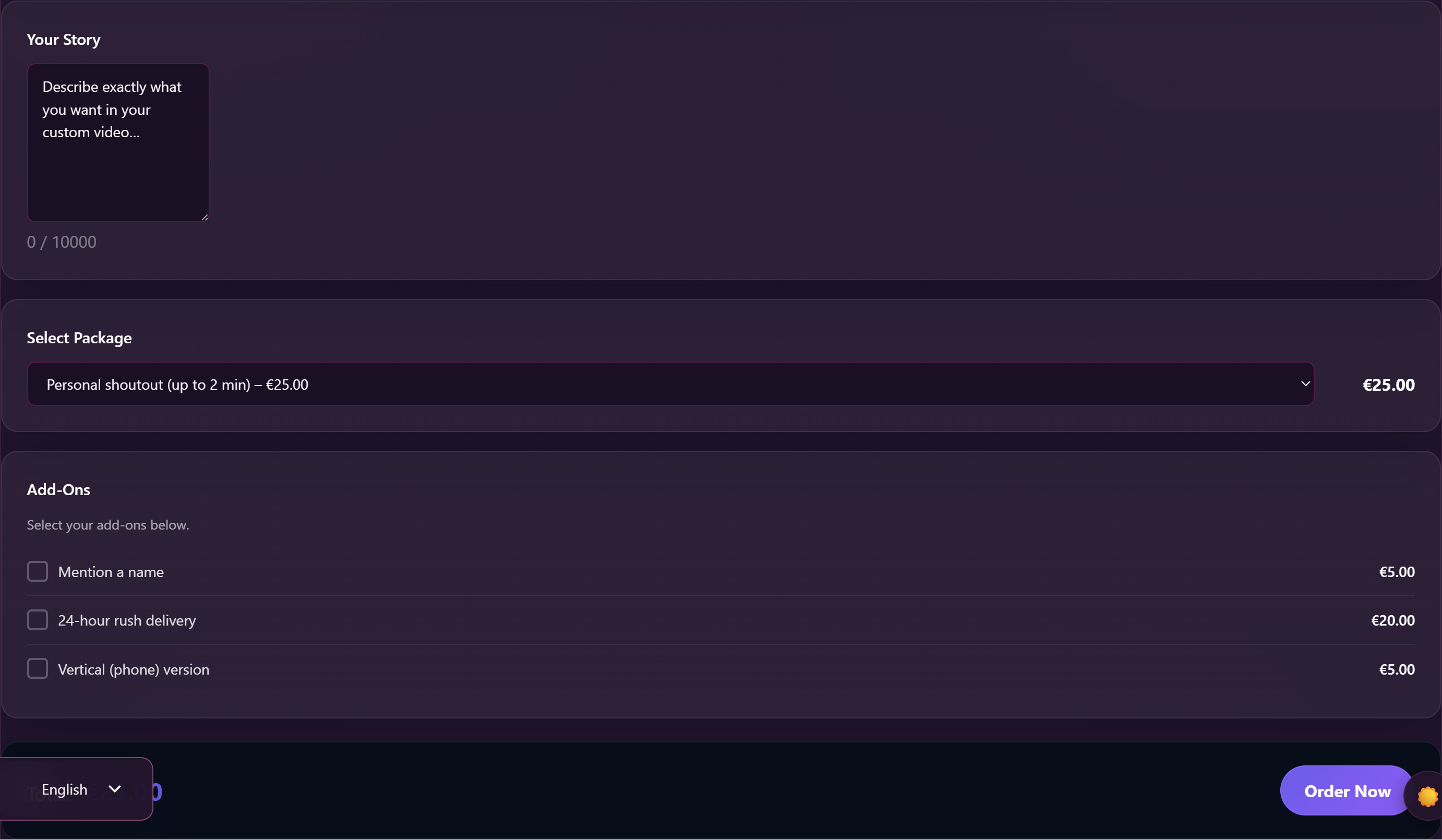
The form has up to six sections, depending on what the creator offers:
- Your Story — the brief. Up to 10,000 characters. This is the most important part. Describe the clip exactly as you want it: what they should say, what they should wear, what should happen, in what order. The creator only sees what you write here, so be specific.
- Select Package — pick the length. Each package shows a price and a per-minute rate so you can compare.
- Add-Ons — checkboxes for any extras the creator offers (props, costume changes, name shout-outs, role-play prompts, etc.). Each one shows its price; tick the ones you want.
- Resolution — radio buttons for video resolution. The default tier is usually free; higher tiers may cost extra.
- Delivery — radio buttons for how fast you want it. The standard tier is usually free; rush options cost extra.
- Exclusive — see the next section.
The total updates live as you tick boxes. When you’re done, click Order Now.
4. Should you make it Exclusive?
If the creator offers it, the form has a section called Exclusive with a checkbox Make it Exclusive and the description: “Upgrade to a private, exclusive custom – for your eyes only.”
Tick this if you want the clip to belong only to you. Once it’s delivered, it stays hidden from the rest of the platform — nobody else can see it, search for it, or buy it. It only appears in your library.
Exclusive customs cost more (the creator sets the price; it’s added to your total) because the creator gives up the ability to sell that clip to anyone else, ever. It’s the right choice if you want your story to stay yours; it’s overkill if you’re happy that the clip might one day appear in the creator’s regular catalogue.
5. After you click Order Now
Three things happen as soon as you submit:
- You see a confirmation: “Your custom order has been placed as order #X. The creator will review it before payment opens.”
- An order is created in your account at My Account → Orders with the status Pending — but it’s parked. You don’t pay yet.
- The creator gets a notification with your story, your package, your add-ons, and the total. They’ll review the request and decide whether to accept it.
You don’t need to do anything during this step. The creator either accepts, declines, or messages you with questions. You’ll get a notification when something changes.
6. The creator accepts — paying for the order
If the creator accepts your request, the order opens up for payment. You’ll see a note on it that reads: “Your custom order was accepted. Please complete payment so the creator can start working on it.”
Open the order from My Account → Orders and complete payment the normal way. You can pay from your wallet balance or through one of the supported payment methods.
The creator might also ask you to pay a small extra fee on top of the package price — for example because the brief includes special props, an unusual setting, or a rush turnaround they don’t normally offer. If they do, you’ll see the fee on the order with the reason they wrote (e.g. “Special props, extra scene, rush delivery…”). The total updates accordingly. If a fee shows up that you didn’t expect, message the creator before paying.
As soon as payment settles, the order status flips to Paid and the creator can start work. You’ll see: “Payment received for your custom order. The creator can start work now.”
7. While the creator is filming
You don’t need to watch the order page. When the creator marks the request as In progress, you’ll see a note: “The creator started working on your custom order.”
How long it takes depends on the delivery tier you picked and the creator’s usual turnaround. You can always send a polite DM if you want to check in — but don’t expect rapid updates. The creator is filming for you and that takes the time it takes.
If you forgot something or want to change a detail, message the creator as soon as possible. Once the clip is filmed, changes are usually impossible without a re-shoot.
8. Delivery — getting the clip
When the creator finishes the clip and uploads it, it goes through our normal moderation review (the same review every clip on the platform goes through). Once it’s approved, two things happen automatically:
- The custom order flips to Ready. You get a note on your order: “Your custom order is ready. You can now open the order and download the delivered video.”
- The clip is attached to your order as a download and added to your library.
You can play it from My Account → My Library just like any other clip you’ve bought, and you can download it from the order page as many times as you want.
If you ordered an Exclusive custom, only you can see the clip. It never appears in the creator’s catalogue, in search, or in anyone else’s library.
Once delivery is confirmed and payment is settled, the order quietly moves to Completed. You’re done.
9. If the creator declines or cancels
Sometimes a creator says no. If they do, the order is cancelled and you’ll see: “The creator declined this custom order request.”
If you hadn’t paid yet (which is normal, because payment only opens after acceptance), you’re not charged. The cancelled order stays in your history so you can reference it.
If for some reason you had already paid and the order is being cancelled, the refund is handled by our support team rather than automatically — open a support ticket and we’ll work it out with you and the creator.
Frequently asked questions
Q: How much does a custom cost?
The creator sets the prices. The order form shows you the package price, any add-ons, the resolution tier, the delivery tier, the exclusive upgrade if you tick it, plus any custom fee the creator adds for unusual requests. The total updates live as you tick boxes — what you see on the form is what you’ll pay.
Q: Can I see how much I’ve spent so far before I commit?
Yes. The form shows a running total at the bottom labelled Total:. It updates every time you change a package, tick an add-on, or pick a different resolution or delivery tier. You only commit when you click Order Now, and even then you don’t pay until the creator accepts.
Q: How long should I make my Story?
As long as it needs to be — up to 10,000 characters. Be specific: who you want them to be (the persona), what you want them to wear, what you want them to say, what should happen, in what order. Vague briefs lead to disappointing clips. Specific briefs lead to clips you actually wanted.
Q: Can I send reference photos or a script?
Not through the form itself — it only takes text. After you submit, message the creator using the Message creator button on their storefront and you can send images and longer text there. (Some attachments may cost a small per-message fee depending on the creator’s rules — see Messaging a creator.)
Q: What if the creator never replies?
The order sits in Pending until they review it. Most creators reply within a few days. If a week passes without a response, you can send a polite DM — and if there’s still nothing, you can open a support ticket and we’ll follow up on your behalf.
Q: Can I change my Story after I’ve ordered?
Not through the form. Message the creator with what you’d like to change. If they haven’t started filming, most creators are fine adjusting the brief. Once they’ve started, changes mean a re-shoot — usually not possible.
Q: Can I cancel the order myself?
Before payment: just don’t pay it. The creator can mark it cancelled themselves, or you can ask them to. After payment: that’s a support-team conversation. Open a support ticket explaining the situation and we’ll work it out.
Q: I asked for an Exclusive but the creator says it’ll appear in their catalogue. What gives?
Check your order. Find the line that lists what you ordered — Exclusive should be on it with the price. If it isn’t, you didn’t tick the box on the form (it’s an explicit checkbox; an order isn’t Exclusive unless you ask for it). Message the creator and they may be willing to upgrade after the fact for the difference in price.
Q: The clip in my library doesn’t match what I asked for. What do I do?
Tell the creator first via DM — most issues get resolved that way. If the creator won’t help, or the clip is genuinely unrelated to what you ordered, open a support ticket with the order number and a short note about what you asked for vs. what you got. We’ll review.
Q: How do I download the clip?
Open My Account → Orders, find the order for your custom, and click into it. The downloads are listed there. You can also play it directly from My Account → My Library.
Need more help?
If something is going wrong with a custom order — payment hasn’t settled, the clip hasn’t appeared after the creator marked it Ready, or there’s a dispute about the brief — open a support ticket and pick the Custom orders category. Include the order number from My Account → Orders and we’ll take a look.







