
You can cancel any subscription on Lewdden at any time, with one click and no questions. Cancelling stops the next renewal — it does not end your access right away. Your subscription stays active until the end of the period you’ve already paid for, and only then does the access switch off. There’s no fee, no notice period, and no penalty for cancelling early.
This guide walks you through finding the right subscription, cancelling it, and what happens afterwards (including how to come back if you change your mind). To start a new subscription, see Subscribing to a creator.
1. Open My Account → Subscriptions
- Sign in to your account.
- Open My account from the top-right menu.
- Click Subscriptions in the sidebar.
If you have only one active subscription, the menu item is labelled My Subscription (singular). If you have more than one, it’s Subscriptions (plural). They go to the same page either way.

The page lists every subscription you’ve ever started — active, on hold, and cancelled — newest first.
2. Open the subscription you want to cancel
Find the row for the creator you want to cancel and click View on the right-hand side.
The details page shows everything about that subscription:
- The creator’s name and the plan length.
- The current status (Active / Pending cancellation / Cancelled / On hold).
- The Next payment date — your access continues at least until this date.
- The price that will be charged at the next renewal.
- The list of past renewal orders.
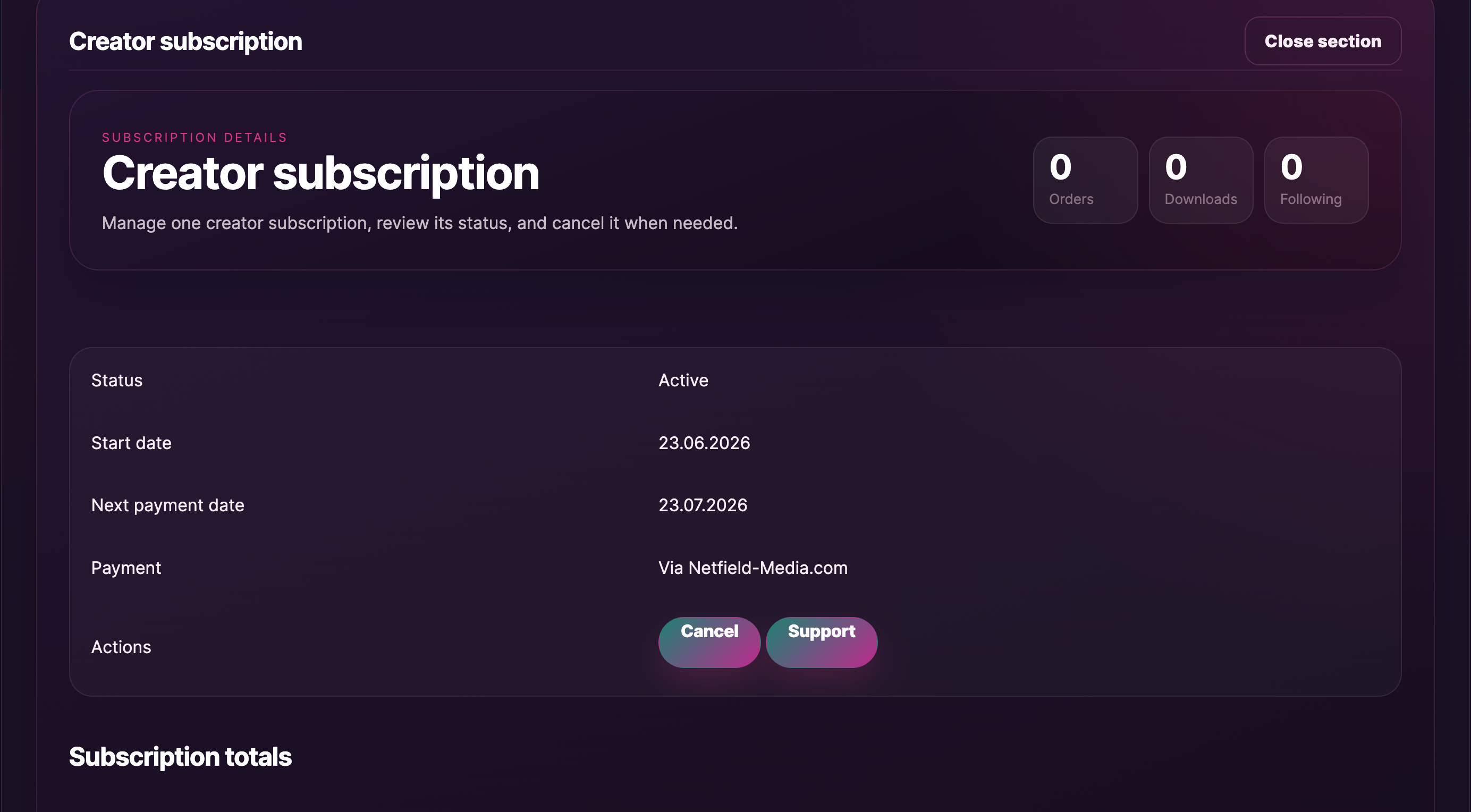
3. Click Cancel
In the Actions row at the top of the details page you’ll see a single Cancel button. Click it.
Why is Cancel the only action? Lewdden keeps the subscription page deliberately simple — there’s no separate “pause,” “renew now” or “reactivate” button to confuse things. Cancel is the one switch you need: it stops future renewals while leaving the access you’ve already paid for in place.
A confirmation prompt appears. Confirm the cancellation and the page reloads with the updated status.
That’s it — you’re done. No follow-up email is required, no support ticket needed.
4. What happens next
After you confirm:
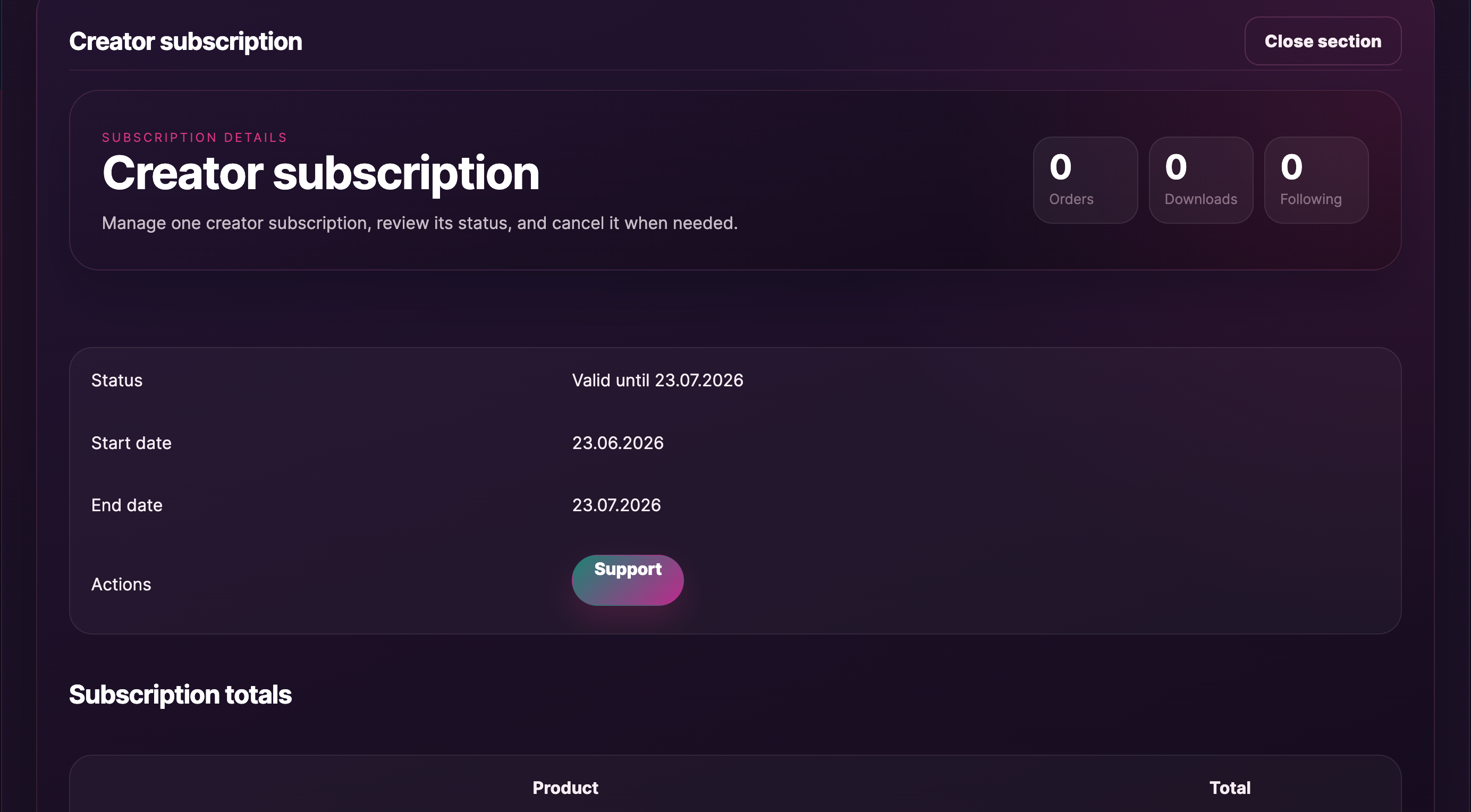
- The subscription’s status flips to “Pending cancellation” straight away.
- Your access stays active — every clip, recording, subscriber-only feed post, and (where the creator allows it) the message thread stay open until the end of the current paid period.
- No new charges will be taken. The “Next payment date” you saw before becomes the date your access ends, not a new billing date.
- You’ll get a confirmation email noting that the subscription has been cancelled and listing the date your access will end.
When that end date arrives:
- The status flips from Pending cancellation to Cancelled.
- The creator’s subscriber content locks again — clips and recordings are no longer playable, the subscriber feed posts hide, and (if the creator’s inbox is subscribers-only) the Message button disappears from their store.
- The subscription stays on the My Account → Subscriptions list with the Cancelled status, so you have a record of it.
5. Why there’s no refund on cancellation
Subscriptions are digital products and aren’t refundable. The principle is straightforward: you paid for access through the end of the current paid period, and you get to keep that access until the period ends — there’s no pro-rata refund for the unused part. Cancellation stops the next renewal so you’re not charged again, but the current period’s charge stays.
To stop being charged again, the Cancel button in §3 is the only step you need — there’s nothing else to fill in.
6. If your subscription is “On hold”
A subscription goes on hold when a renewal payment fails — typically an expired card or insufficient funds. While it’s on hold, your access is paused but the subscription is not yet cancelled.
You have two choices from the details page:
- Update your payment method. The subscription resumes automatically on the next successful payment, and your access opens back up.
- Cancel. The Cancel button works the same way as on an active subscription — it stops the renewal attempts and marks the subscription as Cancelled. Because access is already paused, there’s no further period to wait through.
7. Coming back later — how to resubscribe
Lewdden subscriptions are intentionally one-direction: once cancelled, a subscription stays cancelled. There is no “reactivate” or “resubscribe” button on the cancelled subscription. If you change your mind:
- Go to the creator’s storefront —
/store/<creator>/. - Click the Subscribe button as if you were subscribing for the first time.
- Pick a plan and complete checkout. See Subscribing to a creator for the full walkthrough.
The new subscription is a fresh subscription — it starts on the day you subscribe again, has its own payment method, and its own renewal cycle. None of the unlocks from the previous (cancelled) subscription carry over; once your old period ended, those unlocks closed.
Common questions
Q: I cancelled — am I locked out immediately?
No. Your access continues until the end of the current paid period. The cancellation only stops the next renewal; everything you already paid for stays open until the period’s end date. The end date is shown right on the subscription details page after you cancel.
Q: Will I get a refund for the unused part of the period?
No. Subscriptions are digital products and aren’t refundable. You keep the access you already paid for until the period ends — that’s the trade-off — and cancellation stops the next renewal so you’re not charged again.
Q: I cancelled by accident — can I undo it?
There is no “reactivate” button. Subscribe afresh from the creator’s storefront — your old subscription stays Cancelled in your history, and the new one starts a fresh period on the day you subscribe again.
Q: How do I stop a renewal without losing my current access?
That’s exactly what cancelling does. Cancellation stops the next charge and leaves your current paid period intact.
Q: Can I just turn off auto-renew and keep the subscription “active until I want to renew again”?
No — there is no auto-renew toggle on Lewdden. Subscriptions are recurring while active, and cancelling is the way to stop the renewal. After the current period ends, the subscription goes to Cancelled and you’d subscribe afresh to come back.
Q: I have several active subscriptions — does cancelling one affect the others?
No. Subscriptions are per-creator. Each row in My Account → Subscriptions has its own status, its own renewal date, and its own payment method. Cancelling one leaves the others untouched.
Q: What happens to the messages I’ve sent the creator?
Your messaging history stays in your inbox. If the creator’s inbox is subscribers-only, you won’t be able to send new messages once the period ends — but the messages you’ve already exchanged are still readable.
Q: Will the creator be told that I cancelled?
Creators see the count and timing of subscribers leaving, but not personal cancellation reasons or the names attached. If you’d like to give feedback to the creator directly, message them while you still have an active subscription.
Q: My subscription is on hold — does cancelling it cost me anything?
No. On-hold subscriptions are not charging you. Cancelling an on-hold subscription just makes the cancellation final — there’s no extra fee and no refund implication, because no payment was successfully taken.
Q: I cancelled a 12-month plan after one month — do I keep access for the remaining 11 months?
Yes. You paid for 12 months up-front, so you keep access for the full 12 months. Cancellation only stops the next renewal at the end of that paid period.
Q: My status says “Cancelled” but I’m still seeing locked content. Why?
Refresh the page once. Subscriber unlocks happen the moment payment confirms (and re-lock at the moment a period ends); the page sometimes needs a refresh to pick up the change.







