
Following a creator is the free way to keep up with their new clips, live streams, and feed posts — without subscribing or buying anything. This guide covers how to follow, what changes when you do, and how following is different from subscribing.
1) The Follow button — where to find it
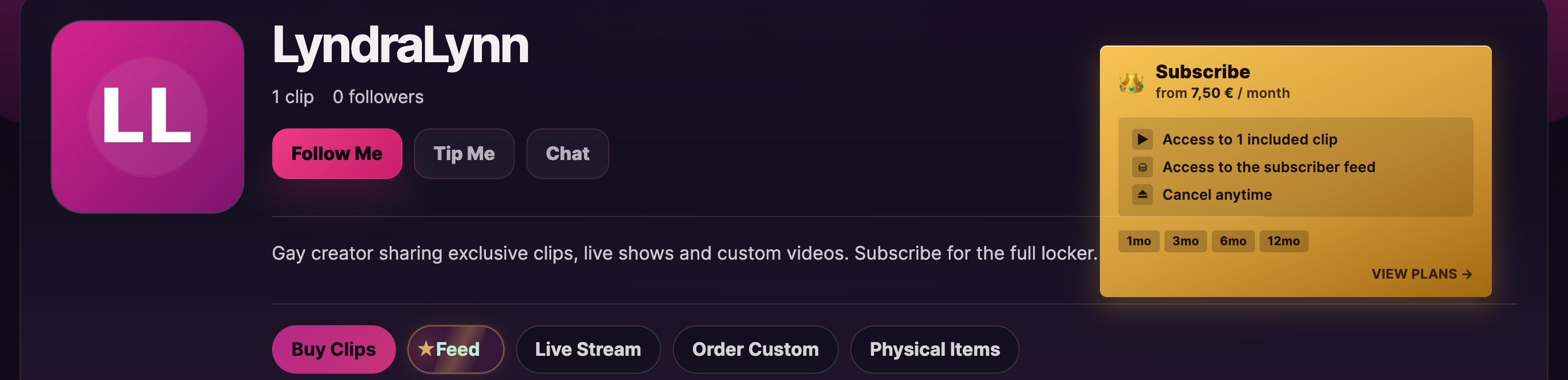
Every storefront has a Follow Me button right at the top of the storefront page, next to the creator’s avatar and bio. Click it once: the label flips to Following and the creator’s follower count goes up by one. That’s the entire follow action — no form, no fee, no confirmation step.
You can also follow from a few other places:
- Any clip’s purchase page — there’s a smaller Follow Me button next to the creator’s name above the player.
- Search results — the storefront preview cards have an inline Follow Me button on hover.
- Live-room player — when watching a stream, the creator’s name in the toolbar opens a quick popover with a Follow Me option.
To unfollow, just click Following. It flips back to Follow Me and the creator’s follower count goes down by one. No confirmation prompt — it’s a one-click toggle in either direction.
If you’re not signed in, clicking Follow Me opens the sign-in screen with the message “Please sign in to follow this creator.” — sign in and the follow goes through automatically.
2) What changes once you follow
- The creator appears on your My Account → Following page with their avatar and a link straight to their storefront. Handy for jumping back to a creator you don’t otherwise have a subscription with.
- You get a digest email when they publish new clips or go live (configurable — see §4 below).
- Following does not change how you message them. Whether you can DM a creator — and whether it is free, costs tokens per message, needs a one-time unlock fee, or requires a subscription — is decided entirely by that creator’s chat settings, not by following. Following never grants free messaging on its own (see Messaging a creator).
- Your name shows up in their followers list on their storefront analytics. They don’t see your email or fan-account details — just your display name and follow date.
3) Follow vs. Subscribe — the distinction
It’s easy to mix these two up. Side-by-side:
- Follow. Free. One click. Lets you track when they publish new things and re-find them easily. No paid content unlocked.
- Subscribe. Paid (monthly). Unlocks subscriber-only content (feed posts, clips marked sub-only, possibly subscriber-only streams), often gives you free message replies, and may include clip discounts. See Subscribing to a creator.
You can do either, both, or neither. Subscribers are typically following too (it’s a natural step), but you don’t have to be a follower to subscribe — and being a follower doesn’t auto-subscribe you to anything.
4) The new-content digest email
The platform sends a digest email summarising new clips and recent activity from creators you follow. By default it goes to the email on your account. The subject line follows the pattern “X new updates from creators you follow”.
To turn it off — or change how often it lands — go to My Account → Account details. The notification preferences sit just under the password fields. (If you’ve never seen the digest, check your spam folder; the first one usually lands there until your inbox has classified the sender as wanted.)
The digest doesn’t show paid content as “you can buy this” — it shows creators-you-follow’s recent activity so you can decide what to check out. Click any item to open the creator’s storefront in a new tab.
5) Managing your follow list
The My Account → Following page lists every creator you follow. Each card has:
- The creator’s avatar and display name, both linked to their storefront.
- A short meta line with the count of clips and the count of followers (e.g. 12 clips · 240 followers).
- A latest-update hint when the creator has posted recently.
- An Open model button that takes you to their storefront, plus Tip and Chat placeholders (the placeholders aren’t active buttons today; the working flows are on the storefront itself).
To unfollow, open the creator’s storefront and use the Follow Me toggle there — it switches between Follow and Unfollow on a single click. The /my-account/following/ page doesn’t currently have a per-row unfollow button, so the storefront toggle is the route. There’s no follower limit — you can follow as many creators as you like.
6) FAQ
Q: Does following cost anything?
No. Follow is free, forever. The only paid action on a creator’s storefront is buying a clip, subscribing, tipping, or paying for an exclusive message.
Q: Will the creator know I followed them?
Your display name appears in their followers list, and they get a notification depending on their settings. They never see your email, your billing details, or anything else from your account.
Q: Can I follow without making my display name visible?
The follow appears under whatever Display name is set on your Account details. Pick a username-style display name there if you want to follow with privacy.
Q: I followed a creator and now I’m getting too many emails. How do I tone it down?
Two options: (1) unfollow specific creators whose digests you don’t want, or (2) reduce the digest frequency / turn it off entirely from Account details‘s notification settings.
Q: Does following give me access to subscriber-only content?
No — that’s what subscribing is for. See Subscribing to a creator for what subscribing unlocks.
Q: What happens to my follows if I close my account?
The follow records are removed when the account closes. Creators’ follower counts drop by one. See Closing your account.
Q: A creator I followed paused their storefront. Will I still see their digest items?
While the storefront is paused, no new clips / posts publish, so there’s nothing to digest. The follow itself stays in place and resumes naturally when the creator returns.
Q: Can creators block followers?
Creators can block specific users from messaging them in DM (see Messaging a creator). They can’t surgically block someone from following the public storefront — but if a follower is being abusive, the right path is to report the user (see Reporting a creator or content‘s creator-side note) and the safety team will handle it.
Need more help
For anything else about following, the digest emails, or the difference between follow and subscribe, open a ticket under Account & login at Contacting support. To find new creators worth following in the first place, see Finding creators you’ll like.







