
Video guide
Prefer to watch? This video walks through pricing a clip — the minimum, picking a number, and running a timed sale on the Sales screen.
Lewdden lets you set whatever price you want for each clip you publish, with one rule: the minimum is €4.99. There is no upper limit, no per-tier permission, no audit. This guide walks through how the platform thinks about clip pricing, what levers you have (regular price, timed sales, subscriber pricing), and a few practical patterns that other creators use.
If this is your first clip, also read How to add a clip for the upload-to-publish walkthrough, and How creator payouts work for what your share means in concrete numbers.
1. The €4.99 floor and why it exists
Every clip on Lewdden is priced at a minimum of €4.99. The platform enforces this on every form that creates or edits a clip — the price field won’t accept anything lower, and the system rejects any price below €4.99 with the message “The minimum clip price is €4.99.” This applies to:
- New clips uploaded through the Add Clip form.
- VOD-as-clip publishing (when you publish a livestream recording as a paid clip from the VOD manager).
- Trim-and-publish flows.
Why the floor: payment processing has a fixed cost per transaction (a few cents on cards, a few cents more on SEPA, plus the gateway’s per-transaction fee). At a price below €4.99 the fixed cost eats a disproportionate share of the sale, leaving very little for both the creator and the platform. The €4.99 floor keeps the economics workable on every transaction without per-clip exceptions.
There is no upper limit. You can price a clip at €9.99, €19.99, €49.99, €199 — whatever the market for your work supports. The platform doesn’t second-guess.
2. Picking a price
Pricing is genuinely yours to set. A few practical patterns other creators use:
- The €4.99 / €7.99 / €9.99 ladder for short-to-medium clips (5–15 min). Most first-time buyers feel comfortable in this range and conversion is higher than at higher tiers.
- €14.99 / €19.99 / €24.99 for longer clips, multi-camera productions, or strongly niche content where the audience is willing to pay for specificity.
- €39.99+ for full-length custom productions, multi-creator collabs, or full-show recordings (e.g. a one-hour ticketed show published as a VOD).
- Match the clip’s value, not its length. A focused 5-minute scene with a strong hook can outperform a 25-minute clip that’s mostly setup. Length is a poor proxy for value.
A few specifics about the price input:
- The price is in EUR and uses two decimal places (step
0.01). €4.99, €7.50, and €19.95 all work. - The price is the gross price the customer pays. The 50 / 50 split is applied automatically — you keep 50 %; the platform half covers payment processing, infrastructure, moderation and funds the 20 % affiliate programme (up to 70 %* in total for you). VAT in the EU is the platform’s burden, not yours.
- You can change the price after a clip is published. Existing buyers keep their access at the price they paid; the new price applies to new buyers from the moment you save the change.
If you’re not sure where to start, €7.99 for short clips and €14.99 for longer clips is a defensible default — re-price up or down based on how the first 10 sales feel.
3. Running a timed sale
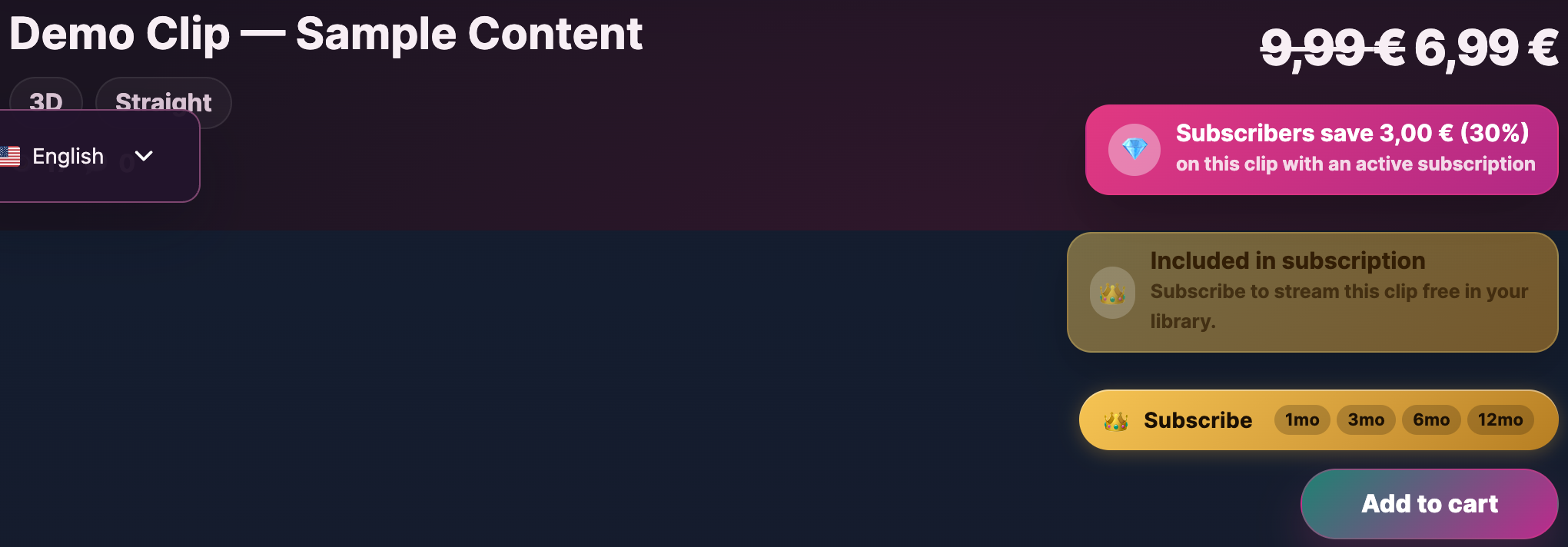
Beyond the regular price, every clip supports a timed sale price — a discounted price that’s active during a window you set. The customer sees the regular price struck through and the sale price next to it, with a sale badge.
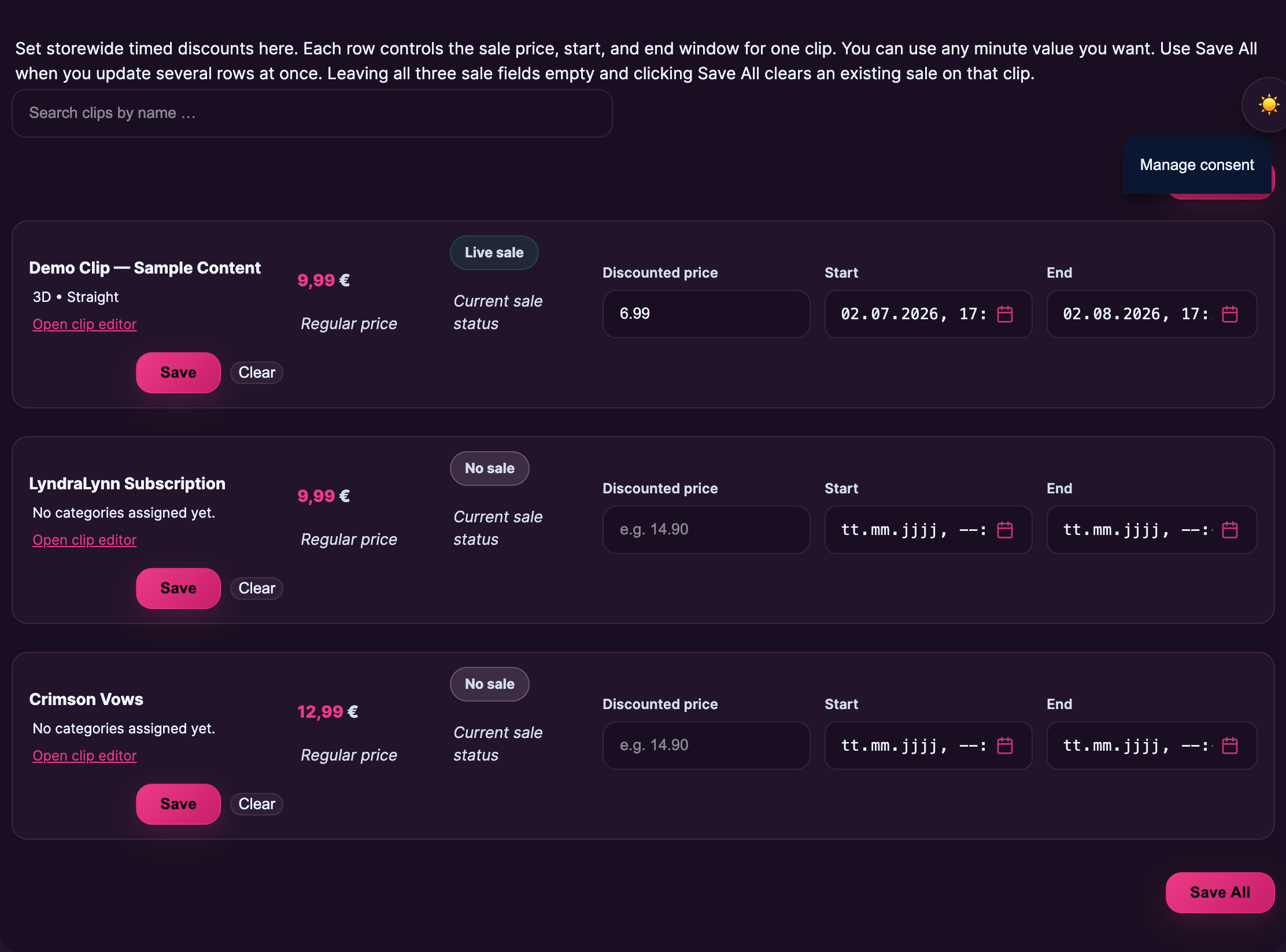
Timed sales are managed from the Sales screen in your store manager. Each row controls one clip:
- Sale price. The discounted price the customer is charged during the sale window. Must still be ≥ €4.99 (the floor applies here too).
- Start. When the sale becomes active. Defaults to “now” if you leave it empty.
- End. When the sale expires. The clip automatically reverts to the regular price.
You can use any minute value you want for start and end — there’s no minimum or maximum window. A 24-hour flash sale, a 7-day sale tied to a campaign, a 30-day “back catalogue refresh” — all work the same way. Leave all three sale fields empty and click Save All to clear an existing sale on a clip.
Active discounted clips also surface on the platform’s /sales archive — the page that aggregates every currently-discounted clip across all creators. Running a sale means your clip appears there for the duration, which is incremental traffic on top of your own storefront.
Practical sale ideas:
- Launch sale. Drop a new clip at the regular price. Run a 48-hour 30 % sale immediately for early adopters.
- Weekend flash sale. Pick 2–3 older clips, sale them Friday afternoon to Sunday evening at 25–40 % off.
- Anniversary sale. Once a year, run a wider catalogue sale around your platform anniversary or a specific milestone.
- Subscriber-driven sale. Pair the timed sale with a feed post telling your subscribers it’s running — they’re your most engaged audience and convert at higher rates than cold visitors.
4. Including clips in your subscription
Subscribers to your storefront can be given full free access to clips you choose to include in the subscription bundle. This is not a discount on the clip price — it’s free streaming access to the included clips for as long as the subscription is active. A “Included in subscription” badge appears on the included clips on your storefront so non-subscribers can see what they’d unlock by subscribing.
Inclusion is configured per creator (not per individual clip price). On your subscription settings page, you choose one of two modes:
- All clips included. Every clip you publish is automatically free for active subscribers — past clips, current clips, and any future clips you upload. This is the default setting and the simplest to manage.
- Selected clips only. You curate a list — only the clips you explicitly mark are free for subscribers; everything else stays at its regular (or sale) price. Useful if you want to keep premium or custom-tier work outside the subscription bundle.
Either way, subscribers get free streaming access to the included clips and the clip card on your storefront shows the “Included in subscription” badge so non-subscribers see the value of subscribing.
Want to discount clips for subscribers without giving them away free? That’s a different feature — see §5 below. Inclusion (this section) makes a clip free for active subscribers; subscriber pricing (§5) gives subscribers a cheaper price on clips you don’t include in the bundle. Most creators use both: the strongest clips go in the inclusion bundle, the rest get a percentage discount.
Pair clip inclusion with locked subscriber-only feed posts (see Subscribing to a creator for the customer-side view) — together they make the value of subscribing tangible.
5. Subscriber pricing — a discount that follows the buyer
If you want subscribers to pay less for your clips — without making them free, the way inclusion does — you can set a subscriber discount. Active subscribers automatically see and pay the discounted price across your storefront, the clips archive, and the clip’s own page. Non-subscribers see the regular (or sale) price. The discount applies as soon as a buyer’s subscription becomes active and stops the moment it cancels or expires.
You configure it on the same page where you set up the subscription itself: Store manager → Subscription settings. Two levers, both optional:
- A global discount percent — one slider that applies to every clip you publish. Set it to 30 %, and a €19.99 clip costs subscribers €13.99. Set it to 0 % to switch the discount off.
- A per-clip override — a small table on the same page lets you set a specific subscriber price on individual clips, overriding the global percent for those clips. Useful when you want a flat €X for a particular clip rather than a percentage off.
A subscriber pays the lower of the global percent or the per-clip override on each clip. The €4.99 floor still applies — a subscriber discount can never push a clip below €4.99. If your global percent would calculate to less than €4.99 on a cheap clip, the subscriber pays €4.99.
How it stacks with timed sales
If a clip is on a regular timed sale (§3) and the buyer is also a subscriber, the subscriber pays whichever price is lower — the sale or the subscriber discount. They never pay more than a non-subscribing customer. So if you put a €23 clip on a 50 % sale (€11.50) and your subscriber discount is 30 % (€16.10), subscribers pay the €11.50 sale price; the discount doesn’t double-stack on top.
How it stacks with inclusion
Inclusion always wins. If a clip is in your subscription bundle (see §4) AND has a subscriber discount, subscribers get the clip free — the discount doesn’t matter for that clip. Inclusion and subscriber pricing are designed to work together: bundle the clips you want to give away, discount the rest.
What subscribers see
On clip cards (storefront, clips archive, search, your storefront): a small green “Subscriber price €X.XX” pill in the corner of each card the discount applies to. On the clip page itself: a green “Subscriber price applied — you save €X.XX (X% off)” line right next to the price. Non-subscribers see a teal “Subscribers save X%” teaser instead, so they know subscribing is worth it.
What about the 65 / 35 split?
Your earnings are calculated on whatever the buyer actually paid. A subscriber buying a discounted clip earns you 50 % of the discounted amount, not 50 % of the regular price. That’s the same logic as a timed sale — see §6 below for how the split flows to your payout.
For a dedicated deep-dive on subscriber pricing — including more worked examples and edge cases — see Offering clip discounts to your subscribers.
For the customer side of subscriptions, see Subscribing to a creator and Buying a clip.
6. How a clip sale flows to your payout
When a fan buys a clip:
- They pay the price shown (regular or sale, in EUR).
- The payment processor takes the gross amount.
- 50 % is recorded to your earnings ledger immediately. The other 35 % is the platform share.
- Your earnings accumulate through the period (typically a calendar month).
- At the end of the period, the platform exports your share to a SEPA payout, which reaches your bank account between the 4th and the 7th of the month (the 7th at the latest).
There is no per-clip fee, no per-sale processing charge above the 65/35 split, and no minimum payout threshold — even small balances pay out. See How creator payouts work for the full flow including what happens with refunds, chargebacks, and disputed transactions.
If a clip is reviewed and rejected post-sale (rare, but possible if a moderator or reporter flags it under Prohibited content), the associated earnings are frozen pending review — see the prohibited-content article for the enforcement-tier details.
7. Common pricing mistakes — what not to do
A few patterns that don’t work well, observed across the creator base:
- Pricing every clip at the floor. €4.99 is a price ceiling for your shortest, most accessible clips, not your default. Pricing everything at the floor signals you don’t value your own work and trains buyers to wait for sales.
- Pricing without testing. A clip with zero sales at €19.99 might convert well at €12.99 — and vice versa. Try a price; if the first ~10 views don’t convert, drop it for the next clip rather than waiting six months.
- Permanent sales. A clip that’s “always on sale” trains buyers to wait, and the sale badge loses signal. Keep sales bounded with real start + end times.
- Pricing your back catalogue too high. Older clips often perform better at lower prices — they’re the on-ramp that turns first-time buyers into subscribers. A €4.99–€7.99 entry price on older work is a deliberate marketing choice, not a discount.
- Pricing custom orders the same as catalogue clips. Custom orders are bespoke work; price them accordingly (typically 2–4× a catalogue clip of the same length).
Common questions
Q: Can I sell a clip for less than €4.99 — say €2.99?
No. The €4.99 floor is enforced everywhere — the price field won’t accept lower amounts, and any price below €4.99 gets rejected with “The minimum clip price is €4.99.” There’s no exception.
Q: Is there an upper limit on the price?
No. The platform doesn’t second-guess what you charge. €99 or €299 clips are normal in some niches; ultra-niche custom productions go higher.
Q: I changed a clip’s price after publish. What happens to existing buyers?
Their access is unaffected. They keep what they bought at the price they paid. The new price applies to new buyers from the moment you save the change.
Q: Does VAT come out of my 50 %?
No. VAT in the EU is the platform’s burden, not yours. The price you see (the customer-facing gross price) is the price you base your 50 % share on.
Q: How do I run a sale without burning the clip’s perceived value?
Bound the sale with a real start and end. A 48-hour or 7-day window with the badge that says “ends Sunday 23:00” creates urgency. A clip that’s always 30 % off looks like the sale is the regular price.
Q: Can I bundle multiple clips into a single purchase?
Bundling for clips isn’t a built-in feature — each clip is sold individually. If you want to do a “buy 3, save €5” pattern, the practical workaround is to run a timed sale across the three clips for the same window, or to publish a longer “compilation” clip with all three scenes back-to-back at a single price.
Q: Do timed sales work on the storefront and on the platform-wide /sales archive?
Yes — both. While a sale is active, the clip surfaces on your storefront with the sale badge AND on the platform’s /sales archive (an aggregate page across all creators with active sales). That’s incremental traffic on top of your own audience.
Q: I want to give a specific buyer a custom price. Can I?
Use the custom-order flow rather than discounting the public clip. Custom orders let you negotiate price 1:1 with the requester without affecting the public price for everyone else.
Q: Does the 50 % apply to sale prices and subscriber prices too?
Yes — to whatever the customer actually paid. €4.99 sale price → €2.50 to you (50 %). €19.99 regular → €10.00 to you. €23 clip with a 30 % subscriber discount → subscriber pays €16.10, you earn €8.05 (50 % of €16.10). For clips included in your subscription bundle, subscribers pay nothing extra (the clip is part of their monthly subscription fee), so the 65/35 split runs through the subscription’s monthly price instead.
Q: My subscriber discount calculates to less than €4.99 on a cheap clip. What happens?
The subscriber pays €4.99. The €4.99 floor applies to subscriber pricing the same way it applies to regular pricing — a percentage discount can’t push a clip below the platform minimum. If a clip’s regular price is already at or below €4.99 (which can happen on a timed sale, since sales are allowed below the floor), subscribers pay the same as everyone else for that clip.
Q: Should I use the global percent or the per-clip override?
Use the global percent for “every clip is X % off for subscribers” — it’s set-and-forget and applies to clips you upload in the future automatically. Use the per-clip override when you want a specific clip at a specific number — for example, a €25 clip you want subscribers to get for exactly €15 rather than 40 %-something off. You can use both at the same time: the override takes precedence on the clips it covers; the global percent fills in for everything else.







