
Video guide
Prefer to watch? This video walks through the automatic subscriber discount — setting the global percentage, the floor, and per-clip prices.
If you’ve enabled creator subscriptions, you can give your subscribers a discount on every clip in your store — automatically, with no coupon codes for them to copy or apply. This is separate from the inclusion bundle (clips that are completely free for subscribers as part of their subscription). The discount feature applies to clips that aren’t in the bundle and would otherwise charge full price; subscribers see a lower price, pay the lower price from their wallet, and you earn 50% of whatever they actually paid.
There are two ways to set the discount: a global percentage that applies to every non-included clip, and per-clip overrides that pin a specific subscriber-only price on individual clips. Both live on the same page in the store manager.
1. Where to find it
Open lewdden.com/store-manager/creator-subscriptions/ — the same page where you set up subscription plans + the inclusion bundle (see Setting up your subscription tier for the rest of the page).
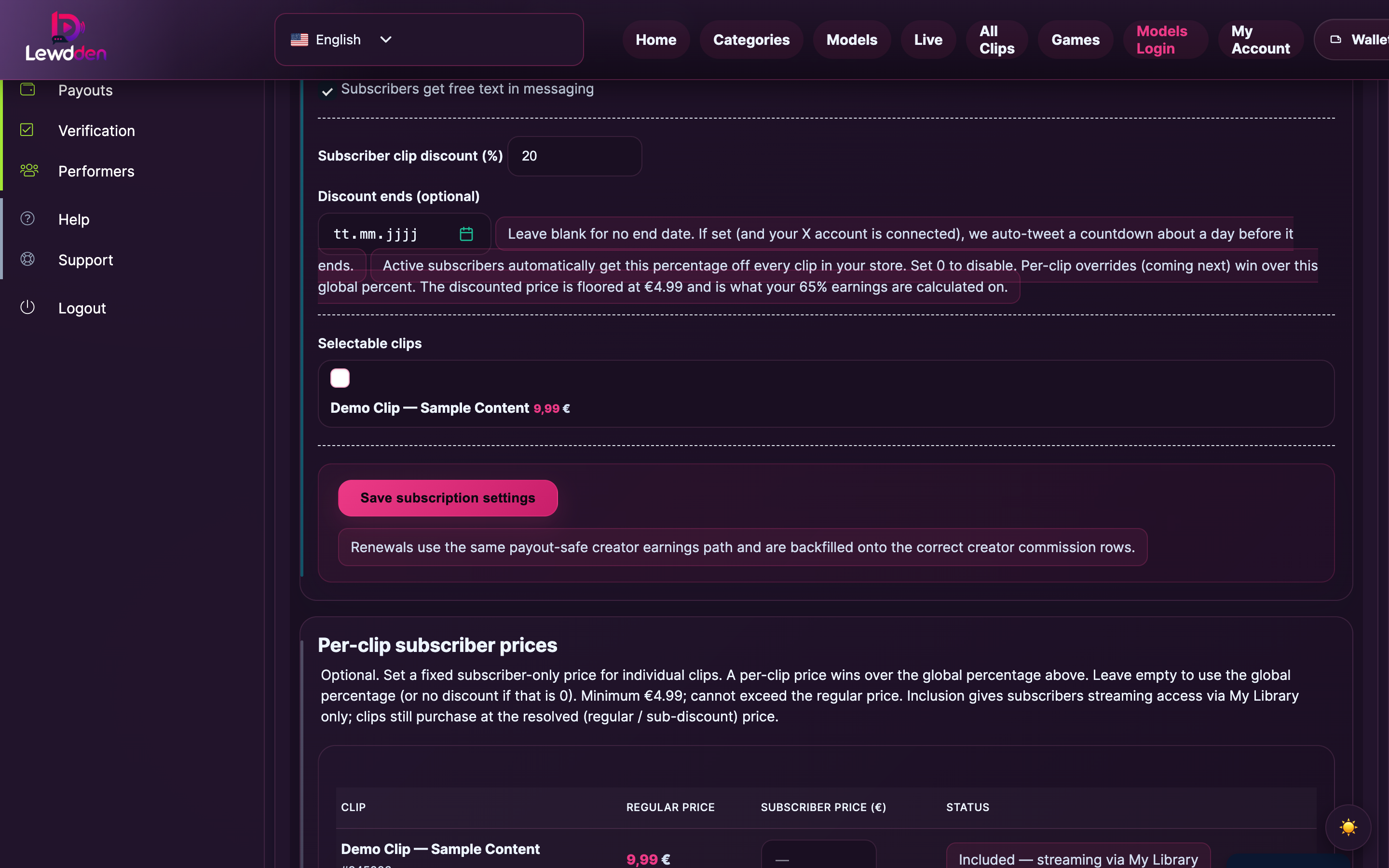
You’ll see two relevant sections, in this order:
- “Offer a store subscription” — contains the Subscriber clip discount (%) field for the global percentage.
- “Per-clip subscriber prices” — contains the override table where you can pin specific prices on individual clips.
Subscriptions must be enabled (monthly price set, store subscription toggle on) for either field to do anything for fans.
2. Setting a global percentage
The field
- Label: Subscriber clip discount (%)
- Range: 0 to 99 (whole numbers, integer step).
- Default: 0 (disabled).
- Save button: the Save changes button at the bottom of the Offer a store subscription section.
What it does
Active subscribers automatically pay (100 − N) % of the regular price on every clip in your store, where N is the percentage you set. So:
- Set 20 → subscribers pay 80% of the regular price.
- Set 50 → subscribers pay half.
- Set 0 → subscribers pay full price (the discount is off).
Example: clip’s regular price is €10. You set the global discount to 30%. A subscriber sees the clip listed at €7. They pay €7 from their wallet at checkout; you earn 50% × €7 = €3.50 (commission is always calculated on what the subscriber actually paid, see §5).
The €4.99 floor
The discounted price is floored at €4.99 — the platform-wide minimum clip price. If the maths would take a subscriber’s price below €4.99, the platform serves the clip at €4.99 instead. This matches the same floor applied to all clip prices on the platform; see Pricing your clips for the full price-rules picture.
If you want a subscriber price below €4.99, the only way is to include the clip in the subscription bundle (free for subscribers, see Setting up your subscription tier §4 for the inclusion modes).
What if a clip is on sale already?
The subscriber pays whichever is lower: the sale price or the subscriber-discounted price. The platform compares both at checkout and serves the cheaper. (See §4 for the full stacking rules.)
3. Setting a per-clip override
The global percentage is the easy lever for “everyone gets X% off”. Per-clip overrides give you finer control — pin a specific subscriber-only price on individual clips that doesn’t follow the global percentage.
Where the table lives
The Per-clip subscriber prices section sits below the main subscription form on the same page. It lists every clip in your store with four columns:
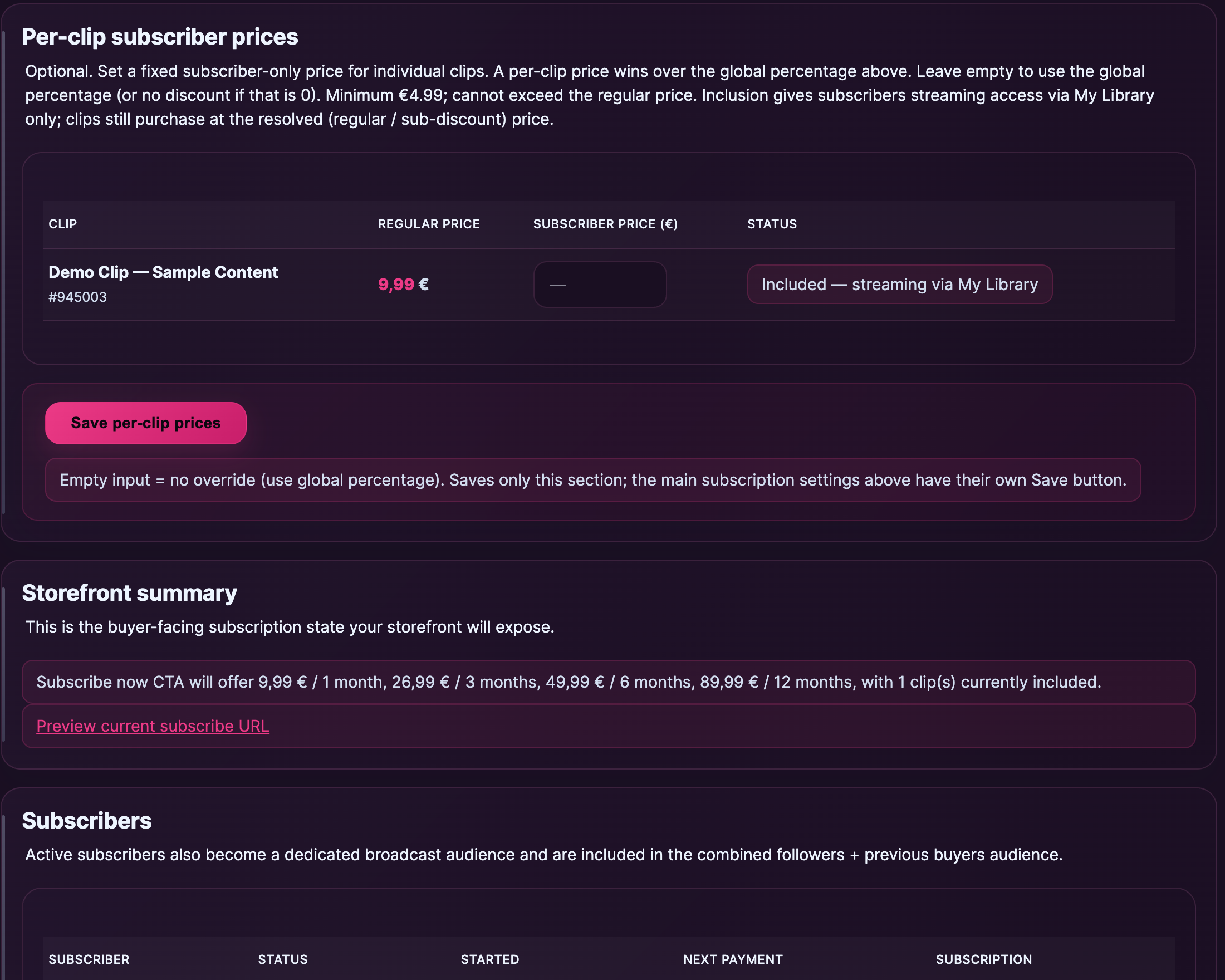
- Clip — clip title + clip ID.
- Regular price — current public price (after sale, if active).
- Subscriber price (€) — empty by default; type a number here to override.
- Status — one of: blank (nothing set; uses global percentage); the override price you typed; or “Included — free for subscribers” for clips that are already in the inclusion bundle.
Setting an override
- Find the clip row.
- Type a price in EUR in the Subscriber price (€) field (e.g.
7.50). - Scroll to the bottom of the section and click Save per-clip prices.
Each row’s input is independent. Empty input means “no override — use the global percentage if any”. Filled-in input wins over the global percentage for that clip only.
Override rules
- Minimum €4.99 — same platform floor as global. The form rejects values below that.
- Cannot exceed the regular price — if your override is higher than the clip’s regular price, the form rejects it. (You can’t use this to raise the price for subscribers.)
- Inclusion wins — if a clip is in the subscription inclusion bundle, the row’s status shows Included — free for subscribers and any override you’ve set is ignored. To charge subscribers for that clip, remove it from the inclusion bundle first.
“Save per-clip prices” is a separate save
The override table has its own save button (Save per-clip prices) at the bottom of the section. It saves only the override table — the main subscription settings above have their own Save changes button. Edit one, save it; edit the other, save it. They don’t share state and saving one doesn’t affect the other.
4. How the discount stacks with sales + the inclusion bundle
Three overlapping pricing surfaces can affect what a subscriber pays for a given clip. The platform resolves them in this order:
- Inclusion in the subscription bundle wins outright. A subscriber sees the clip free; nothing else applies.
- If not included, the per-clip subscriber price (if you set one) takes precedence over the global percentage.
- If no per-clip override, the global percentage is applied to the regular (or sale, see below) price.
- Sales: when a clip is on a timed sale, the platform compares the subscriber-resolved price (per-clip override OR global-%) against the sale price and serves whichever is cheaper. So:
- Subscriber-resolved €7, sale price €6 → subscriber pays €6.
- Subscriber-resolved €7, sale price €8 → subscriber pays €7.
- Sale below €4.99 → subscriber pays the sale price (the floor only applies when the discount maths would push below; sales already below the floor stay as-is).
- The €4.99 floor can’t raise a price; it only applies when the discount maths would push below it.
Non-subscribers see the clip at its regular or sale price as normal — the discount is invisible to them in the cart, but they may see a teaser badge on storefront cards (see §6).
5. What you earn — commission contract
Creator commission is 50% to you, 50% to the platform, calculated on the gross amount the subscriber actually paid at checkout — not on the regular pre-discount price.
Worked examples (assuming a regular price of €10):
| Scenario | Subscriber pays | Your earnings (50%) | Platform (50%) |
|---|---|---|---|
| No discount | €10.00 | €5.00 | €5.00 |
| Global 30% discount | €7.00 | €3.50 | €3.50 |
| Per-clip override €5.50 | €5.50 | €2.75 | €2.75 |
| Floor kicks in (override would be €4.00) | €4.99 | €2.50 | €2.49 |
| Sale at €6, subscriber-resolved €5.50 | €5.50 | €2.75 | €2.75 |
| Inclusion bundle (clip is free for subscribers) | €0.00 | €0.00 | €0.00 |
Inclusion bundle clips earn you nothing per-purchase because the subscriber’s monthly subscription fee is what’s already paying for that access — you receive 50% of the subscription fee on the regular payout cycle. See How creator payouts work for the full payout mechanics.
6. What subscribers (and non-subscribers) see on your storefront
Subscribers see a clear price tag on every card and product page:
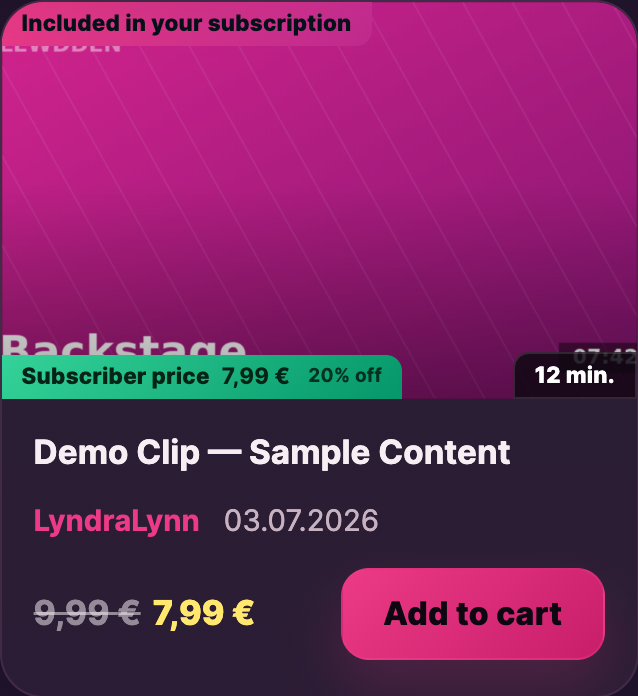
- Cards show the discounted price prominently, with “Subscriber price” or similar callout depending on whether you’ve used the global percentage or a per-clip override.
- Product pages (the clip’s full page) show the same with the percentage saved alongside.
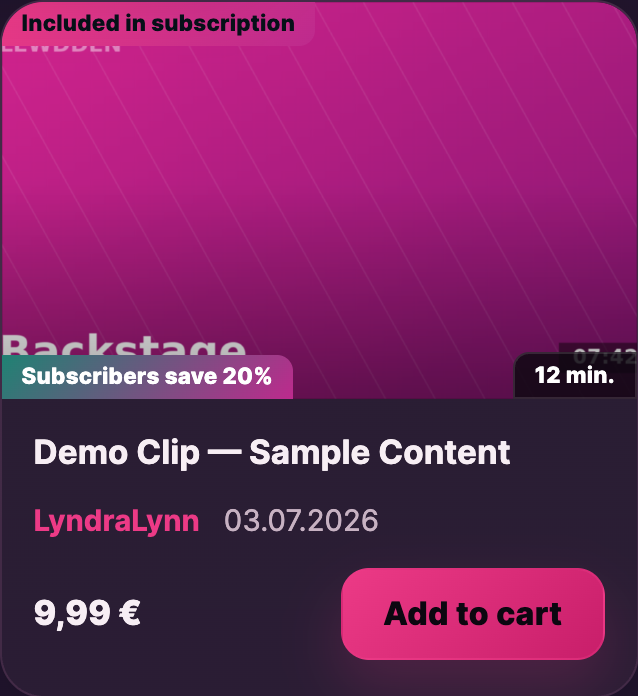
Non-subscribers browsing your store see a teaser badge on cards for clips that have a subscriber discount available — something like “Subscribers save €X (Y%)” — without seeing the discounted price itself. This is a subtle nudge towards subscribing without being pushy.
This badge logic only kicks in for creators with subscriptions enabled and a non-zero global percentage (or at least one per-clip override) set. If your subscription is on but you’ve left both at zero / empty, the badges don’t render and your storefront looks the same as a no-subscription store.
Related: for the broader picture of how clip pricing works on the platform — the €4.99 floor, regular pricing, timed sales, and how subscriber pricing fits alongside them — see Pricing your clips §5. For the customer side of subscriptions (what fans see, how they subscribe, what they get), see Subscribing to a creator.
Common questions
Q: I’ve set a global percentage but my subscribers aren’t seeing the discount.
Check three things in order: (1) the clip isn’t in the inclusion bundle (which would show as free instead); (2) the subscriber’s subscription is currently active (cancellations and lapses zero the discount immediately); (3) the discount math doesn’t push below the €4.99 floor — if your regular price is €5 and your discount is 90%, the subscriber sees €4.99, not €0.50, which can look like the discount isn’t applying.
Q: Can I set a different percentage for different subscriber tiers (3-month vs 12-month)?
Not at the percentage level. The global percentage applies equally across every active subscription regardless of plan length. You can use per-clip overrides for fine-grained pricing, but those don’t differentiate by plan length either — every active subscriber sees the same overridden price.
Q: What happens to a subscriber’s discount if they cancel?
The discount is gated on the subscription being active. The moment the subscription ends (cancelled and the period ran out, or payment failed and the grace period elapsed), the subscriber sees regular prices on every clip from that moment forward. Existing purchases they made at the discounted price stay theirs — cancellation doesn’t claw back what they’ve already bought.
Q: Can I exclude specific clips from the global percentage?
Yes. Open the per-clip override row for that clip and type the regular price in the override field. Saving sets that clip’s subscriber price equal to the regular price, which effectively opts it out of the global discount. Or — cleaner — type a price between the global-discount result and the regular price if you want a smaller discount than the global on that one clip.
Q: Can the per-clip override be higher than the regular price?
No. The form rejects values that exceed the clip’s regular price. Subscribers shouldn’t pay more than non-subscribers for the same clip.
Q: Is there a discount on subscription-bundled clips on top of the inclusion?
No. Inclusion bundle clips are free for subscribers; there’s no “free + extra discount” stacking. The bundle is the most-favoured pricing tier already.
Q: Does the discount apply to clips bought as a gift or in a bulk-purchase flow?
Gifting and bulk-purchase are separate features (and both are still partial / planned at time of writing). The discount applies whenever an active subscriber is the buyer — if a non-subscriber gifts a clip to a subscriber, the gifter pays the regular price; the recipient subscriber gets the gift but no discount changes hands.
Q: I changed the global percentage. Does it apply to clips already in subscribers’ carts?
Yes — the platform recalculates cart prices on the next page render. A subscriber viewing a clip with €7 in their cart sees the new price the next time they refresh or proceed to checkout.
Q: My commission is being calculated on what number?
Always on what the subscriber actually paid — post-discount, post-sale, post-floor. Never on the original regular price. See §5 for worked examples and How creator payouts work for the formal rule.
Q: Can I see how many sales came from subscriber-discounted purchases vs. full-price?
Not yet — the reporting dashboard surfaces clip sales as a single number; subscriber-vs-full-price breakdown is on the roadmap. For now, you can infer it from the price each order recorded compared to the clip’s regular price.
Q: What if I switch a clip in or out of the inclusion bundle while subscribers are viewing it?
Inclusion changes are live immediately. A clip you mark as included becomes free for every active subscriber from that moment; one you remove from the bundle goes back to its regular price (with global / per-clip discount applied if set). Subscribers who already streamed the clip while it was included keep their access on past streams; they don’t lose what they already watched.







