
Lewdden pays out to your bank account every month for everything you earned the month before. This guide walks through the share you keep, when payouts run, what you need to set up, and where to track each one.
If you haven’t set up your Partner-ID yet, payouts can’t be sent — see Setting up your Partner-ID for the first time for the click-by-click. Until then, you can still earn freely; the balance just waits.
1. What you earn from
Every revenue stream on Lewdden counts toward your payout, paid out through the same monthly cycle:
- Clip sales — every paid clip purchase in your store.
- Subscriptions — recurring monthly subscribers to your tier.
- Per-minute meters — Premium per-minute, 1:1 Private, Exclusive Private, voyeur peeking.
- Ticketed shows — every ticket sold to your shows.
- Tips — chat tips, tip-menu reactions, tip-goal contributions, Lovense reactions.
- Paid messages — PPV messages, paid attachment unlocks, voice notes.
- Custom video orders — every accepted custom order.
- Physical merch — signed photos, prints, used items, anything you sell from your shop.
Anything that moves tokens or money in your direction goes into your open balance. There’s no separate per-feature payout — it’s all one monthly wire.
2. Your share
Lewdden keeps 35% of brutto (gross) revenue. You keep 50% — that’s your default rev-share rate, applied to everything in the list above. On top, the affiliate program pays you 20% of everything spent by fans you referred — up to 70%* in total.
The 35% platform share covers everything that runs the site: streaming infrastructure, payment-processor fees, identity verification, customer support, fraud protection, the live-room platform, the recording pipeline, hosting, and the team that keeps it all working.
Your specific rate may be higher than 50% if you’ve negotiated a custom deal — your dashboard shows the rate that’s actually applied.
Tokens to euros — the conversion is fixed
Tokens are Lewdden‘s internal currency. The conversion is set and never changes:
- 10 tokens = €1.00
- 100 tokens = €10.00
- 1 token = €0.10
So if a viewer tips you 50 tokens, that’s €5.00 in brutto. You keep 50%, which is €2.50 on your open balance. A 1,000-token ticket sale is €100 brutto → €50 to you — and if the buyer is a fan you referred, the affiliate program adds another 20 % (€20) on top. The math is always that simple — no hidden conversion rate, no FX surprises.
3. The monthly schedule
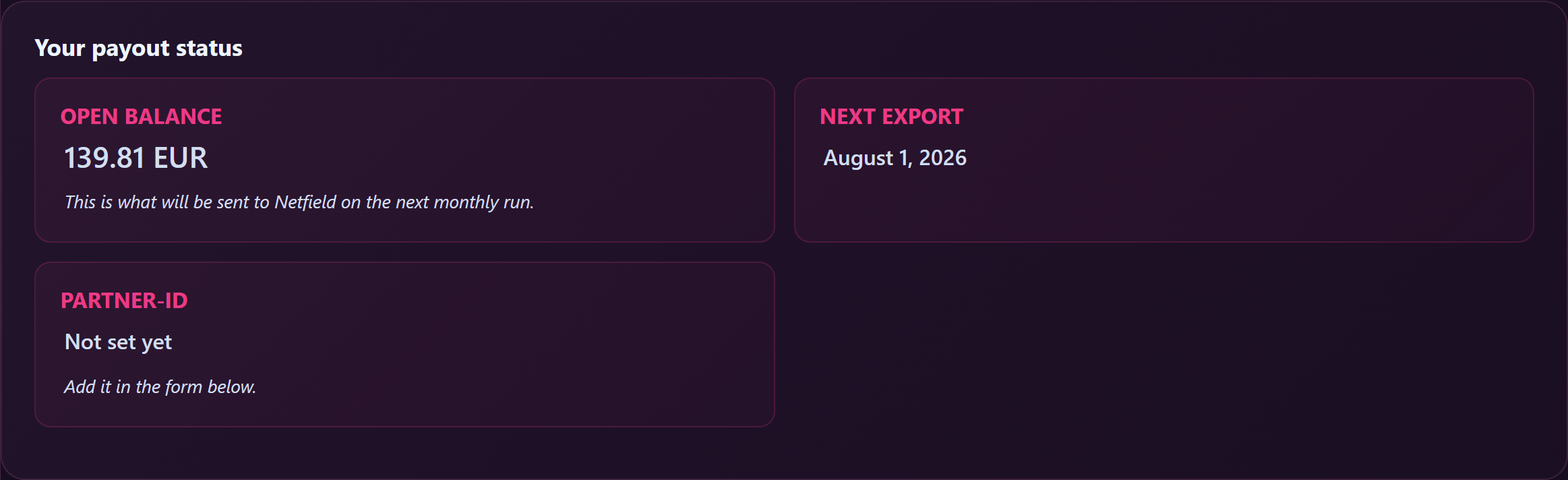
Payouts run on the 1st of each month for everything earned the previous calendar month.
Here’s what actually happens:
- Throughout the month — every sale, tip, meter charge, and message payment lands on your open balance in real time. You can watch this grow on /store-manager/payouts/.
- 1st of next month, 00:05 Europe/Berlin — your previous month’s earnings get frozen into a payout row marked Queued. Open balance resets toward whatever the new month accumulates.
- Same day, shortly after — the system sends your payout file to our payout partner and your dashboard flips to Sent.
- The SEPA bank transfer is then sent — your dashboard flips to Paid, and the money lands in your bank between the 4th and the 7th of the month.
The SEPA transfer is sent right after the monthly file is pulled on the 1st, and the money then reaches your bank account between the 4th and the 7th of the month — the 7th at the latest.

4. No minimum, no fees
- No minimum payout. Whatever you earned last month — €5 or €5,000 — gets sent on the next cycle. Nothing rolls over arbitrarily.
- No payout fees. Lewdden absorbs the SEPA processing cost. The amount in your open balance is the amount that hits your bank account.
If you didn’t earn anything in a given month, no payout row is created — the cycle just skips your account that month.
5. What needs to be in place before payouts can be sent
Two things, both one-time setup:
- Identity verification approved. You can already stream, sell clips, and earn from day one — but earnings only become payable once your verification clears. See Creator onboarding — from sign-up to your first payout for that step.
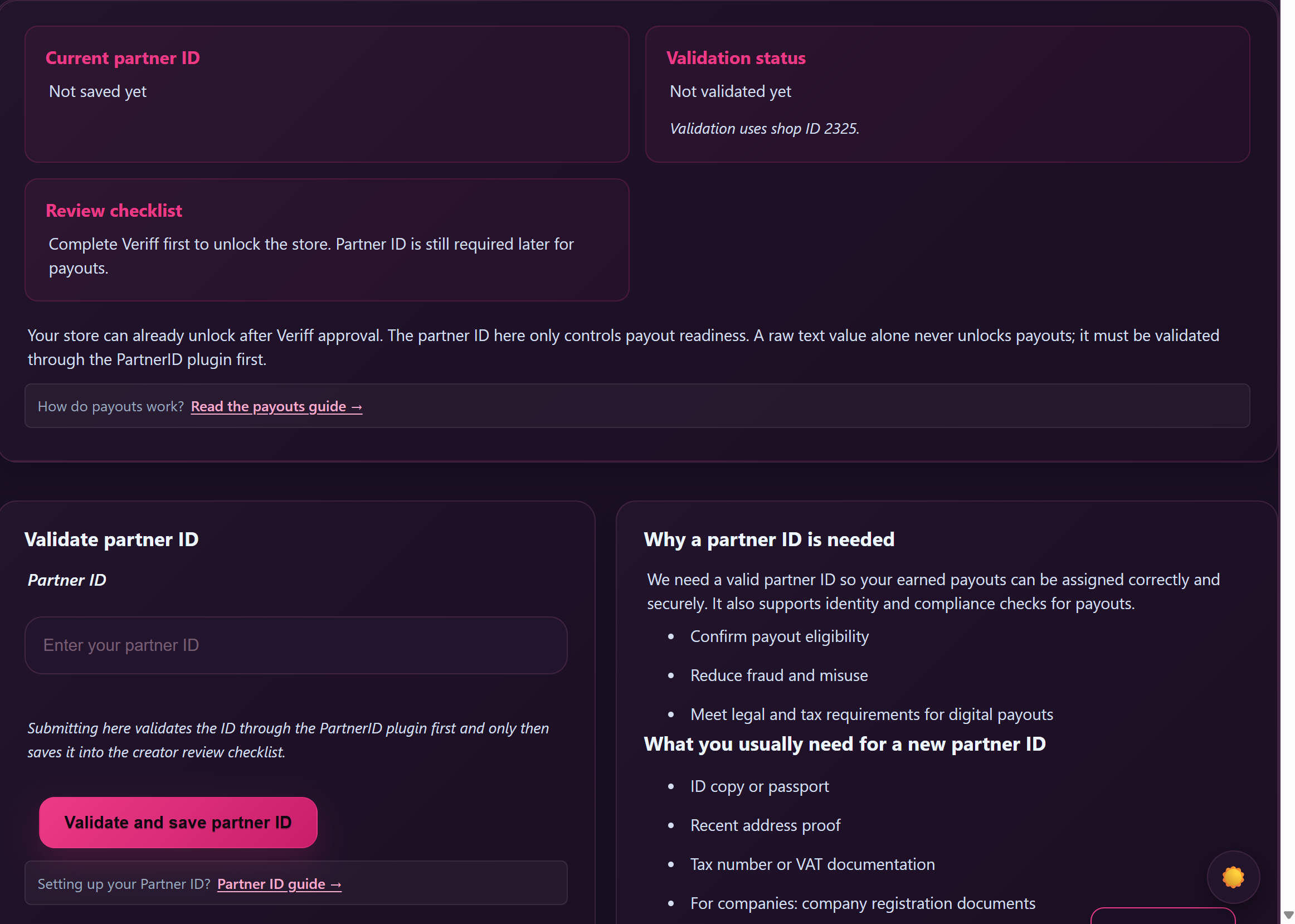
- Partner-ID validated. You register once with our payout partner, get a Partner-ID, and save it on your Payouts page. This Partner-ID is what links your earnings to your bank account for the SEPA transfer. The same Partner-ID works across GuyScat, Lewdden and ScatPortal — register once and reuse it on each site you create on. See Setting up your Partner-ID for the first time.
Both are independent gates. Verification unlocks the store and the ability to earn; Partner-ID unlocks payout transfers. You can do them in either order.
6. Where to track each payout
Open /store-manager/payouts/. You’ll see four blocks below the Partner-ID form:
- Status card — current open balance, the next export date (always the 1st of the upcoming month), and your validated Partner-ID lock.
- Open / awaiting — payouts that have been frozen for a past month but haven’t been paid yet (states: Queued → Sent).
- Paid history — every month that’s already landed in your bank account, oldest to newest.
- No-Partner-ID warning — only appears if you have an open balance but haven’t validated a Partner-ID yet. Acts as a reminder to finish setup before the next 1st-of-the-month cycle.
You’ll also get an email at three points (subjects shown with example amount + period — the live emails sprintf in your actual EUR amount and month name):
- “12.34 EUR queued for your January 2026 payout” — when the monthly export builds (1st of the month).
- “Paid: 12.34 EUR for January 2026” — when Netfield has SEPA-confirmed the transfer.
- “A queued payout was cancelled (and added back to your balance)” — only if something goes wrong and the row is rolled back to your open balance.
7. International creators (no SEPA IBAN yet?)
The SEPA transfer needs an IBAN — ideally a German IBAN, but any SEPA-country IBAN works. If you have a German or other SEPA-country bank account already, you’re set: enter that IBAN during your Partner-ID registration.
If you live outside the SEPA zone (US, UK, Canada, AU, anywhere outside EU/EEA), you’ll need a SEPA-compatible IBAN before payouts can be sent. The three services most international creators use are Wise, Payoneer, and Paxum — all three give you a real EUR IBAN that works for SEPA transfers.
See:
- IBAN setup for international creators (overview) — pick the right service.
- IBAN setup with Wise — full walkthrough.
- IBAN setup with Payoneer — full walkthrough.
- IBAN setup with Paxum — full walkthrough.
You only do this once. After your IBAN is in place, you register the Partner-ID using that IBAN, and from then on payouts arrive in that account every month.
Common questions
Q: How much is a token worth in euros?
10 tokens = €1.00 (so 1 token = 10 cents). The conversion is fixed and never changes. Your dashboard shows both the token totals and the converted EUR amount.
Q: I earned €100 in tips last week — when do I see it?
You see it on your open balance in real time. It gets paid out on the 1st of next month with everything else from this month.
Q: Is the 50% before or after VAT?
50% applies to brutto (gross including VAT where applicable). For German creators, Lewdden handles platform-level VAT obligations for the operator side; consult your accountant for your personal tax situation.
Q: I’m a company / freelancer — anything different?
Same rev-share, same monthly cycle. During Partner-ID registration you provide company-registration documents instead of a personal ID copy. The bank account on file should be your business account.
Q: Can I get paid more often than monthly?
Currently every account is on the monthly cycle. We don’t offer per-week or on-demand payouts.
Q: What happens if my bank rejects the SEPA?
Rare, but if it happens our team will reach out to confirm your IBAN. The payout row is marked Voided and the amount is added back to your open balance, so you don’t lose anything — it just rolls into the next month after we sort out the bank detail.
Q: I changed my bank account — how do I update the IBAN?
You don’t update the IBAN on Lewdden directly — you update it with the partner registration system. Open a support ticket and we’ll point you at the right path. While the change is being processed, queue any pending payout might be held one cycle.
Q: Where do I find my year-end earnings total for tax?
The Paid history block shows every month and the EUR total. For full year-end summaries (with VAT breakdown, gross vs net, etc.) open a support ticket — we generate those on request.
Q: Can I see how each clip / show contributed to my open balance?
Your sales statistics at /store-manager/reports-sales-by-date/ break each transaction down. The payout row collapses everything into one monthly total; the report is where you see the per-item detail.
Need more help?
If a payout shows as Sent but hasn’t arrived after two weeks, or if your open balance looks wrong, open a support ticket from your account and include the period (e.g. “April 2026 payout”) and your validated Partner-ID.
See also: Understanding payout adjustments — a quick read explaining what manual balance adjustments are, where to see them, and what to do if one looks wrong.







