
Video guide
Prefer to watch? This short guide walks the Comments tab in your notification center — the conversation list, replying to a comment, and deleting or handling spam and abuse.
Fans can comment on your clips and feed posts — both on your storefront and in the Discover feed. On Lewdden all of those comments come together in one place so you can reply, keep the conversation healthy, and remove anything that doesn’t belong.
Where your comments live
Go to Store Manager → Notifications → Comments. This tab lists every comment left on your posts and clips, newest first. When new comments arrive, a small number badge appears on the tab; it clears when you open the tab.
The list is grouped into conversations: a top-level comment with its replies nested underneath. A conversation moves back to the top whenever it gets a new reply, so the most active threads are always where you can see them.
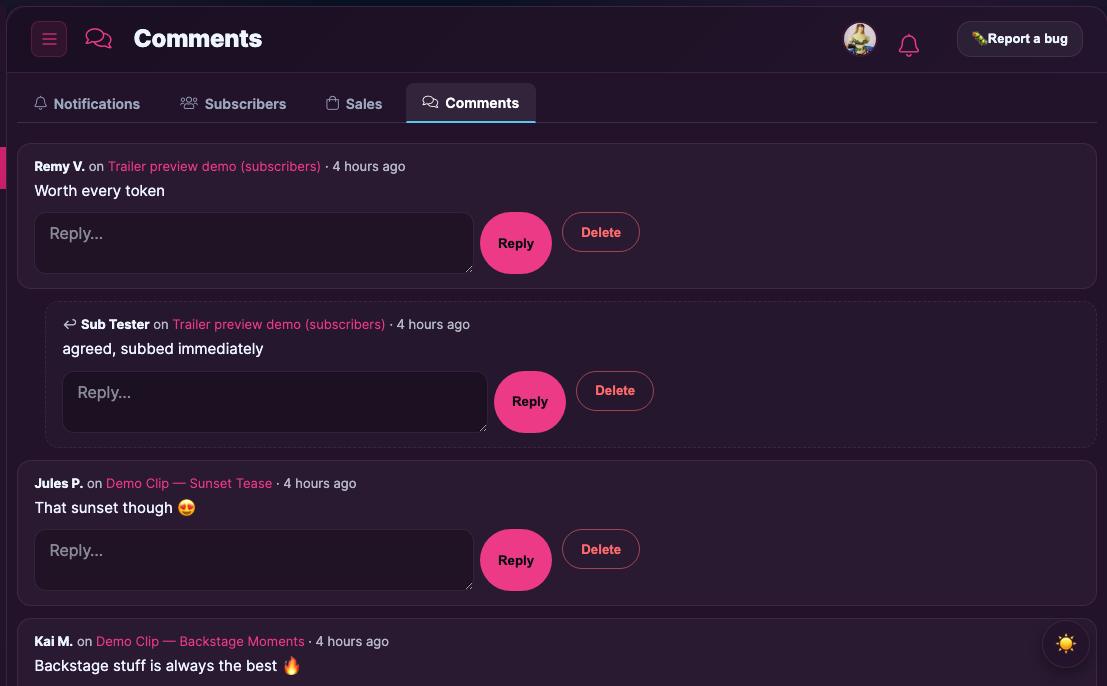
Replying and deleting
- Reply — type in the box and send. Your reply appears under that comment, and everyone in the thread sees it.
- Delete — removes the comment. Deleting a top-level comment also removes its replies. This can’t be undone.
Lots of comments? Paging
If you have more than 30 conversations, use Load older comments → at the bottom to page back through them (and ← Newer to come forward). The counter shows which page you’re on.
Spam protection (automatic)
You don’t need to configure anything — every comment is checked before it’s saved: rate limits stop flooding, links are limited and obvious spam is blocked, and an invisible security check runs behind the scenes so real fans post with a single tap while bots are stopped. Comments that fail these checks never reach your tab.
Administrator moderation
Site administrators also have a platform-wide view of feed and Discover comments as a backstop. Day-to-day, the creator Comments tab above is all you need.
Quick answers
- Do I get an email for every comment? New comments show as an unread badge on your Comments tab; broader activity is summarised in your notification settings.
- Can fans comment on pay-per-view clips they haven’t bought? Yes — commenting is open to signed-in users to keep engagement high; you moderate what stays.
- A comment is abusive — what can I do? Delete it from the Comments tab. For repeat offenders or rule-breaking content, use the reporting flow.







