
Wise (formerly TransferWise) is the IBAN provider we recommend second to international creators, after Paxum. It’s a regulated Electronic Money Institution that gives you a free Belgian IBAN (BE…) in a few hours, and its currency conversion is the cheapest of the three providers we cover — so if you eventually want to move EUR into your local currency, Wise costs the least to do it.
This guide walks you through opening a Wise personal account, getting verified, adding the small balance that unlocks your account details, and copying that IBAN into your Partner-ID registration. Plan on 20 minutes of form-filling plus a few hours up to 1–2 business days for Wise to verify your documents.
For the rest of the payout setup once your IBAN is in place, see Setting up your Partner-ID for the first time. For the bigger picture (rev share, monthly cycle, when payouts run), see How creator payouts work. To compare Wise against Paxum and Payoneer first, see IBAN setup for international creators (overview).
1. Why Wise
Wise is operated by Wise Europe SA, a regulated Electronic Money Institution supervised by the National Bank of Belgium. Two things make it a strong pick for creators who already have payment options but want a clean, low-fee setup:
Wise charges around 0.57% above the mid-market rate to convert EUR into your local currency.
Paxum and Payoneer both run higher conversion markups. If your plan is to receive EUR and then move it into your local-currency bank, Wise saves you the most money on every cycle.
Account creation, holding EUR, and receiving EUR via SEPA are all free, with no monthly or annual maintenance fees.
The only mandatory cost is a small one-time top-up that unlocks account details (and stays in your account — it’s not a fee). After that, the EUR IBAN is fully active.
The trade-off is that Wise reserves the right to review accounts on a case-by-case basis. Most Lewdden creators use Wise without issue, but if you’ve had a fintech account closed before because of adult-creator income, Paxum is the safer pick — see IBAN setup with Paxum.
2. What you’ll need before you start
Get these together before you click sign-up — Wise will ask for them during the application:
- Government-issued photo ID — passport, national ID card, or driver’s license. Both sides if it’s a card.
- Selfie holding the ID — done in-app or in-browser, not a separately uploaded file.
- Residential address — Wise will ask for your current address and may ask for proof if anything in your application doesn’t add up.
- Phone number — for SMS verification.
- A payment method to add the small one-time top-up — debit card, bank transfer, or another funding method available in your country.
- Your full legal name — must match your ID exactly, your Partner-ID registration exactly, and your Lewdden account.
Name consistency matters. If your ID says “Anastasia Maria Sokolova,” that’s the name you put on your Wise account, your Partner-ID, and your Lewdden account too — not a stage name, not an abbreviated version.
3. Open a free Wise personal account
- Go to wise.com and choose Personal account. You can also sign in with Google or Apple if you prefer.
- Enter your email address and create a strong password.
- Fill in your personal details: full legal name, date of birth, residential address, country of residence, phone number.
- Confirm your email. Wise emails you a link or a code — click or enter it to confirm your address.
The application itself takes around 3–5 minutes. Identity verification is the next step and is required before you can request your account details.
4. Verify your identity
From your Wise dashboard, follow the verification prompt:
- Upload your photo ID — both sides if it’s a card. Wise‘s flow will guide you through the camera capture or file upload.
- Take a selfie holding your ID — Wise compares the selfie to the ID photo and to your application details. Make sure the photo is well-lit and your face and ID are both clearly visible.
- Confirm your residential address — sometimes Wise asks for a proof-of-address document at this stage, sometimes not, depending on your country and risk profile.
Verification typically takes a few hours, up to 1–2 business days. Wise emails you when your account is approved.
If your documents are rejected, the email tells you why — usually it’s a blurry photo, a name mismatch, or a missing proof-of-address. Re-upload through the same dashboard panel; there’s no penalty for retrying.
5. Add the one-time balance that unlocks account details
Wise requires a small balance on your account before it gives you local account details (this is an EU-regulatory anti-fraud measure, not a Wise fee).
- From your Wise dashboard, go to Add money and add the equivalent of 20 GBP (about 23 EUR) in any currency you have.
- Pay via debit card, bank transfer, or any other funding method Wise lists for your country.
- The money lands in your Wise balance — it stays there, it’s not a fee. You can spend it, convert it, or leave it.
Once the balance settles, the Get account details option becomes available on your EUR balance.
6. Open your EUR balance and get account details
- From the Wise dashboard home, click Add a currency (or Open a balance) and select EUR (Euro). Your EUR balance is now active.
- Open the EUR balance card and click Get account details (sometimes labelled Account details).
- Wise generates your European banking details instantly.
Your dashboard now shows:
- IBAN — a Belgian IBAN starting with BE (e.g.
BE12 3456 7890 1234). - BIC / SWIFT —
TRWIBEB1XXX(Wise Europe SA). - Bank name — Wise Europe SA.
- Bank country — Belgium.
- Account holder — your full legal name.
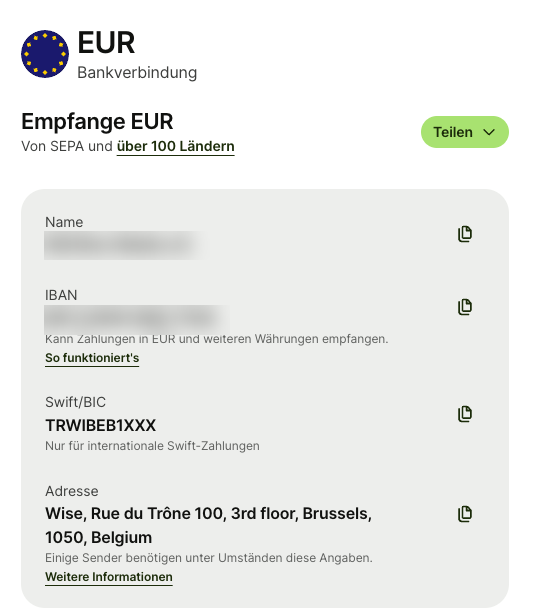
Copy or write down all four — you need them for the Partner-ID step next.
7. Use your Wise IBAN on the Partner-ID registration
Now go back to Lewdden and finish the Partner-ID side:
- Sign in at
/models-login/. - Open
/store-manager/payouts/. - Scroll to the Need a partner ID first? card.
- In the partner registration form (embedded on the page or in a new tab), enter:
- IBAN — your Wise Belgian IBAN (BE…)
- BIC / SWIFT —
TRWIBEB1XXX - Bank country — Belgium (the country of the IBAN, not your home country)
- Account holder name — your full legal name, exactly as it appears on Wise
- Upload the Partner-ID side documents (ID, address proof, tax info, bank-account proof — the bank-account proof is typically a screenshot of your Wise dashboard showing the IBAN and your name).
- Submit. The partner system reviews — typically within a few business days — and emails you a Partner-ID.
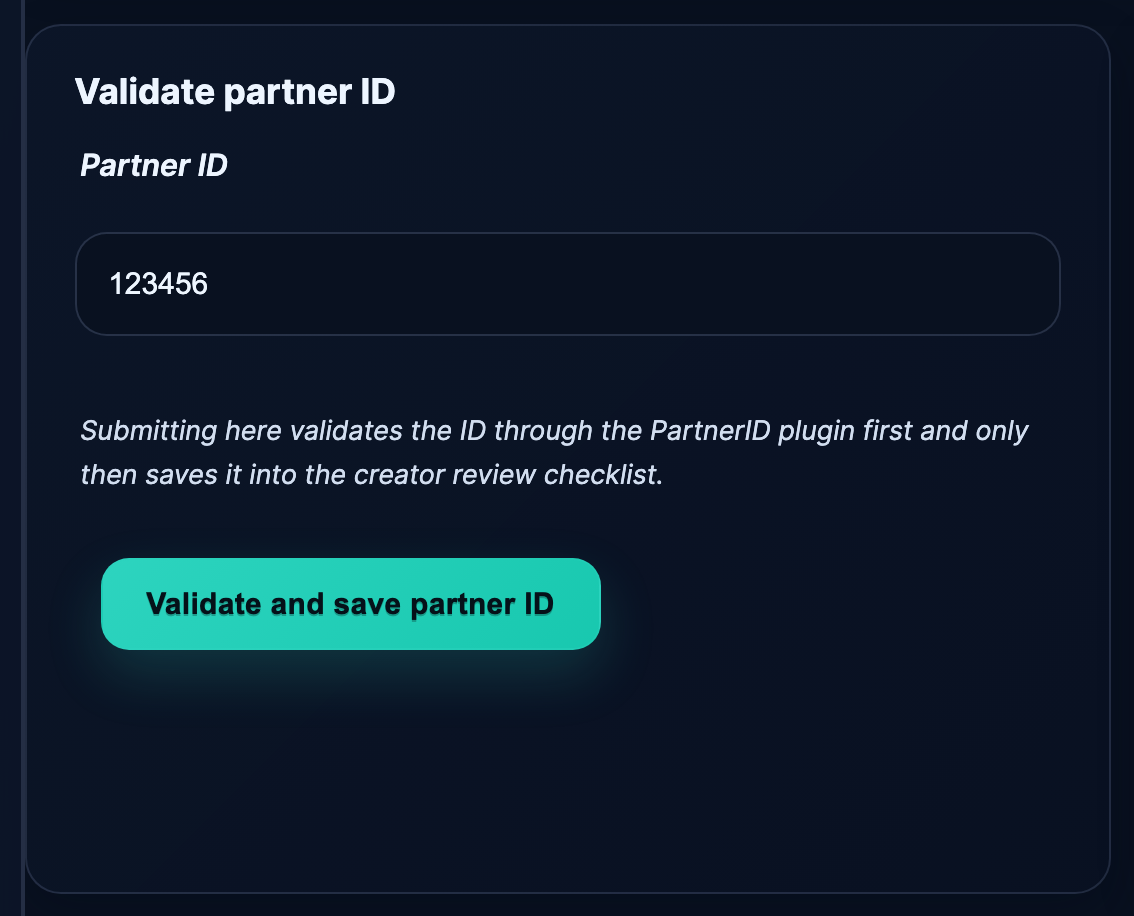
- Come back to
/store-manager/payouts/, paste the Partner-ID into the Validate partner ID form, click Validate and save partner ID.
Once validation passes, your monthly payouts run on the next 1st-of-the-month cycle. See Setting up your Partner-ID for the first time for the click-by-click on this step.
8. Wise fees at a glance
The fees that matter for Lewdden creators receiving monthly EUR payouts:
| Action | Fee |
|---|---|
| Opening a personal account | Free |
| Holding EUR in your balance | Free |
| Receiving EUR via SEPA from a third party (your monthly payout) | Free |
| Receiving EUR via SWIFT | A small fee may apply, depending on the sending bank |
| Account maintenance | Free — no monthly or annual fees |
| Converting EUR to your local currency | ~0.57% above the mid-market rate |
| Withdrawing EUR to your local bank | Free to a small fee, depending on country and method |
The receive side is the headline: every monthly Lewdden payout lands in your Wise EUR balance with zero fee. The cost only kicks in when you convert that EUR into your local currency or send it onward — and even then, the markup is about a third of what most banks charge for the same conversion.
Example — you receive a €100 payout via SEPA. You hold it in EUR for free. When you convert it to USD, you pay roughly €0.57 in conversion fees and receive about $99.43 worth at the mid-market rate.
To minimise fees overall, let your EUR balance accumulate and convert in larger, less frequent batches — or spend the EUR directly using the optional Wise debit card (see below).
9. Optional — order a Wise debit card
Wise offers a Mastercard debit card you can use to spend your Wise balance directly — useful if you’d rather access your earnings without converting them through a local bank first.
The card has a one-time issue fee (varies by country, often around £7 / €7 / $9), no monthly fee, and uses the same mid-market conversion when you spend in a currency you don’t already hold. Two free ATM withdrawals per month are typical, with small per-withdrawal fees beyond that.
The card is entirely optional. Your EUR IBAN works for the Partner-ID payouts whether or not you order one.
Common questions
Q: Is Wise a real bank?
Wise is not a traditional bank — it’s an Electronic Money Institution (EMI), regulated by the National Bank of Belgium for its EU-wide operations and by the FCA (UK) and FinCEN (US) for those regions. For receiving payouts, it works identically to a bank account: you have a real Belgian IBAN that accepts SEPA transfers from any EU bank.
Q: Why is my IBAN Belgian, when I don’t live in Belgium?
Wise issues European IBANs from its Belgian entity (Wise Europe SA). Every Wise EUR balance gets a BE… IBAN regardless of where you live. Set the bank country on your Partner-ID registration to Belgium, not your home country — the Partner-ID system reads the IBAN’s country, not yours.
Q: How long does the whole process take?
Sign-up is 3–5 minutes. Identity verification is usually a few hours, occasionally up to 1–2 business days. The 20 GBP top-up settles in minutes (debit card) or a few business days (bank transfer). Account details unlock immediately once verification + balance both clear. Total: same-day to a couple of business days from “I’ll do this today” to “my IBAN is ready to copy into the Partner-ID registration.”
Q: Wise asked for the equivalent of 20 GBP — that seems weird, why?
It’s a one-time anti-fraud requirement that EMIs in the EU have to meet before issuing local account details. The money sits in your Wise balance, you can spend or withdraw it any time. It’s not a fee.
Q: Wise is rejecting my address — what do I do?
Wise compares the address you typed against the address on your ID and against any proof-of-address document you upload. If they don’t match, the system flags it. Either correct the typed address or upload a recent proof-of-address (utility bill, bank statement, government letter, dated within the last 3 months) and re-submit.
Q: My country isn’t on Wise‘s signup list.
Wise covers 80+ countries — broader than Paxum but narrower than Payoneer. If your country isn’t supported, try Payoneer instead (190+ countries) or check whether Paxum covers it. See IBAN setup for international creators (overview).
Q: Can I use a Wise Business account instead?
Yes — Wise has a Wise Business plan with a separate signup flow that takes additional company-registration documents. Use the business account if you operate as a registered freelancer or company; ask your accountant.
Q: The name on my Wise account differs from my Lewdden name — is that a problem?
Yes. Your name must be identical across Lewdden, your Partner-ID registration, and your Wise account. If the names don’t line up, your monthly payout can be bounced back at the bank when the SEPA transfer arrives, because the beneficiary name on the wire won’t match the Wise account holder. Use your full legal name everywhere — fix the Lewdden side or open a support ticket if you can’t match them.
Q: Why is my BIC different from TRWIBEB1XXX?
For new accounts opened today, the BIC for Wise EUR is TRWIBEB1XXX. Some legacy accounts may show a slightly different BIC for historical reasons — always copy what your Wise dashboard shows on the day you register your Partner-ID, not anything cached in this article.
Q: Can I use Revolut or N26 instead?
If you already have a Revolut or N26 account that came with a SEPA-zone IBAN, yes — use it directly, no third-party setup needed. But if you don’t have one yet, neither is a faster path than Wise: Revolut only issues IBANs to EU/EEA-resident accounts, and N26 only accepts EU/EEA + Switzerland residents. If your reason for reading this article is “I don’t have an IBAN,” Wise (or Paxum / Payoneer) is the correct path.
Q: I already have a Wise account from a different platform — do I need a new one?
No. Use the same Wise account and the same EUR IBAN. Wise doesn’t require a separate account per income source.







